Margin mini cart Woodmart
-
Hello,
I’d like to put a margin on the left of my mini basket because the text is too close to the line. How can I do this?
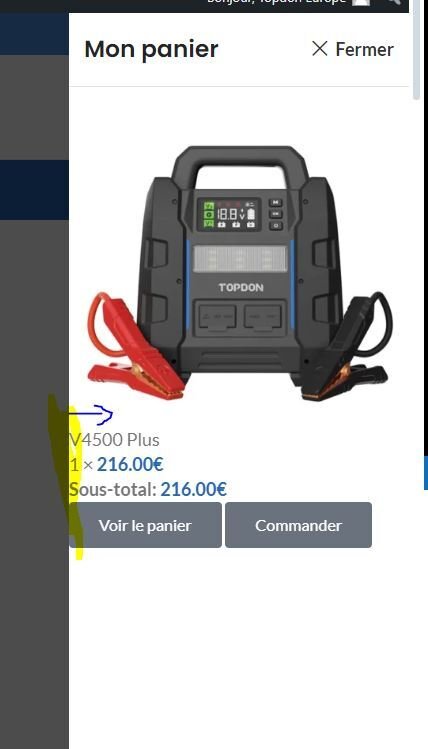
Thank you very much
Hi Cendredelune,
Thanks for reaching to us.
If you are using Woodmart Header builder cart element and Elementor Pro plugin, you need to disable Elementor Mini Cart template that is designed to work with Elementor Pro under Elementor > Settings > Integrations > WooCommerce > Mini Cart Template and select Disable. https://take.ms/Ra7Cv
In case you don’t use Pro version, there is an issue with the 3rd party plugins or Cache plugins. Please clear CDN or cache and deactivate all the 3rd party plugins and activate only theme-required plugins on the site and then check the issue. I am sure your issue will be solved. Then Activate the 3rd party plugins one by one and check which plugin is creating the issue for you.
Regards,
Yes, thank you, that’s exactly it. I’ve deactivated the function in Elementor. Many thanks
Hi Cendredelune,
Glad to hear your issue has been resolved. Keep us in mind for future questions and concerns, we’re always here to help!
If you have a quick minute we always appreciate a 5-star rating on our theme!
https://themeforest.net/item/woodmart-woocommerce-wordpress-theme/reviews/20264492
Your feedback is the motivation to improve our work and services.
Regards,

 .
.
