
Home / Forums / WoodMart support forum / Server CPU: 100%
Home › Forums › WoodMart support forum › Server CPU: 100%
Server CPU: 100%
- This topic has 13 replies, 2 voices, and was last updated 12 months ago by
cpapageorgiou.
-
AuthorPosts
-
November 5, 2025 at 5:05 pm #694479
cpapageorgiouParticipantWe have created an eshop with Woodmart. The problem is that the server CPU is permanently at 100%. We tried deactivating all plugins and activating them one by one but only when we change the theme or enable maintenance mode does it go back to normal.
Attachments:
You must be logged in to view attached files.November 5, 2025 at 5:30 pm #694484
Artem TemosParticipantHello,
Thank you so much for contacting our support center.
To better assist you, could you kindly test the functionality with default WordPress themes such as TwentyTwenty or WooCommerce Storefront? This will help us determine whether the issue stems from our theme or elsewhere.
Regards
November 5, 2025 at 5:32 pm #694486
cpapageorgiouParticipantWhen i switch to another wp theme the cpu usage is normal.
November 5, 2025 at 5:46 pm #694488
Artem TemosParticipantCould you please record a short video where you test both with WoodMart and default theme so we can see and understand the difference?
November 6, 2025 at 10:03 am #694552
cpapageorgiouParticipantNovember 6, 2025 at 10:19 am #694566
Artem TemosParticipantThank you for the video. Please disable all plugins that are not related to our theme and send us your admin and control panel access so we can do the same test and see what is wrong.
Thank you
November 6, 2025 at 11:44 am #694581
cpapageorgiouParticipantHere it is.
-
This reply was modified 1 year ago by
November 6, 2025 at 11:50 am #694586
cpapageorgiouParticipantHere it is
-
This reply was modified 1 year ago by
November 6, 2025 at 12:40 pm #694592
Artem TemosParticipantOK, but where can we monitor the CPU load level that you show in your video?
November 6, 2025 at 2:01 pm #694618
cpapageorgiouParticipantHere is access to server
November 6, 2025 at 4:32 pm #694653
Artem TemosParticipantAre you able to provide us with your server’s SSH access as well so we can monitor your access logs and processes running to see if it is somehow related to the theme or not?
November 7, 2025 at 10:16 am #694741
cpapageorgiouParticipantHere is the SSH credentials
November 7, 2025 at 1:28 pm #694793
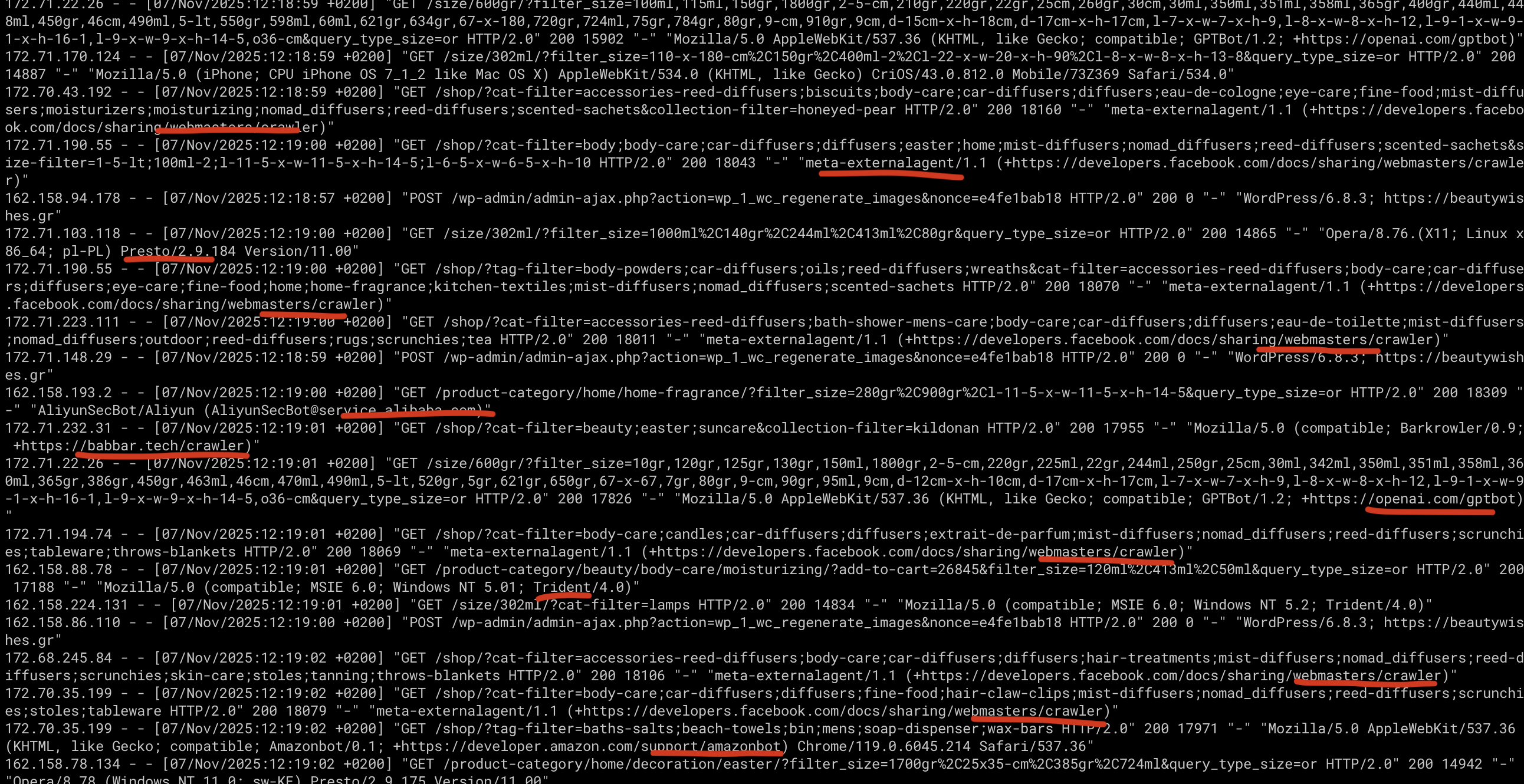
Artem TemosParticipantWe have analyzed the load on your server and noticed that your website is currently being heavily scanned by a large number of different bots. These bots generate many requests to uncached pages, which in turn trigger a high number of database queries and create significant load on the server. As a result, your server cannot handle this load, and you see CPU usage close to 100%. This issue does not depend on the theme you are using.
You notice a difference when you enable maintenance mode because the bots see only a placeholder instead of loading full pages. There is some difference in CPU load when the default theme is active, but that’s because when WoodMart is disabled, your site becomes almost empty — far fewer elements are displayed on your pages, which reduces the number of database queries. If you recreated the same amount of content, widgets, products, images, etc., you would experience the same issue.
The solution is to properly configure access to your website and block harmful bots. Services like Cloudflare handle this very well or you can try to block them manually one by one via the server’s configuration. You can also configure caching on your site to reduce the number of database requests — for example, using WP Rocket. However, as long as these bots continue such abnormal activity, your server will experience performance issues regardless of the theme.
Here is a screenshot from the log
 November 7, 2025 at 2:05 pm #694806
cpapageorgiouParticipantThanks, we’ll look into it.
-
This reply was modified 1 year ago by
-
AuthorPosts

- You must be logged in to create new topics. Login / Register