
Home / Forums / WoodMart support forum / Woodmart + Elementor: Display GTIN/EAN/UPC/ISBN (barcode) in Single Product Meta
Home › Forums › WoodMart support forum › Woodmart + Elementor: Display GTIN/EAN/UPC/ISBN (barcode) in Single Product Meta
Woodmart + Elementor: Display GTIN/EAN/UPC/ISBN (barcode) in Single Product Meta
- This topic has 7 replies, 2 voices, and was last updated 8 months ago by
 Artem Temos.
-
AuthorPosts
-
December 30, 2025 at 2:37 pm #702676
thinkeasy.grParticipantHello Woodmart Support Team,
I’m using Woodmart with Elementor to build my Single Product template. In Elementor I use the “Product Meta” widget, which currently supports only SKU / Categories / Tags / Brand.
I need to display an additional barcode field on the product page (GTIN / EAN / UPC / ISBN) next to the SKU, as part of the product meta area.
Details:
Example product page: [PASTE PRODUCT URL]
Builder: Elementor (Single Product template)
Widget: Elementor “Product Meta” (Woodmart/WooCommerce element)
Barcode storage: WooCommerce product custom field / post meta key: [PASTE META KEY]
(Value example: [PASTE SAMPLE VALUE])Issue:
The “Product Meta” widget has no option to include custom fields (GTIN/EAN/UPC/ISBN).
I also tried injecting it via the standard WooCommerce hook for product meta (woocommerce_product_meta_end), but it does not appear in my Elementor template (possibly the widget does not call the default WooCommerce meta template / hooks).
Request:
What is the recommended way in Woodmart to show GTIN/EAN/UPC/ISBN in the Single Product meta area when using Elementor?
Does the Elementor “Product Meta” widget in Woodmart support WooCommerce hooks (woocommerce_product_meta_start/end)? If not, is there a Woodmart hook/filter or template override to add custom meta fields there?
If you have a built-in option or shortcode/widget for barcode (GTIN/EAN/UPC/ISBN), please point me to the correct method.
Thank you,
ThomasDecember 31, 2025 at 10:38 am #702758Hello,
Thank you so much for purchasing our theme and contacting our support center.
Please send us your admin access so we can check your current configuration and how you use the GTIN/EAN meta. It should be possible without custom code so we will try to help you to implement this.
Kind Regards
XTemos StudioDecember 31, 2025 at 11:05 am #702767
thinkeasy.grParticipantHello Artem Temos,
Thank you for your effort, the passwords are attached.December 31, 2025 at 11:44 am #702781Please send us a direct link to the product where this custom field is specified. Also, need a screenshot of the place where you specify this code in the dashboard while editing the product so we can better understand where it is coming from.
December 31, 2025 at 11:52 am #702782
thinkeasy.grParticipantHello,
Thank you for your reply. Here are the details you requested.
Where the code is specified (dashboard):
The code is stored as a product custom field / product meta (GTIN/UPC/EAN/ISBN). Please see the attached screenshots showing:The “Edit Product meta / Product meta” panel while editing the single product (Elementor preview), where SKU/Categories/Tags are displayed.
The Products list view where the column “GTIN, UPC, EAN ή ISBN” shows the value for the product (e.g. 1234567891012).
Goal:
I want this barcode (GTIN/EAN/UPC/ISBN) to be displayed on the single product page, ideally inside the Product Meta area (next to/below the SKU) in the Elementor single product template.Question:
Could you please confirm the correct meta key you need from my side, or advise the recommended way in Woodmart to output this specific GTIN/EAN/UPC/ISBN meta value within the Elementor Product Meta widget (or via a Woodmart hook/element)?kind regards
ThomasDecember 31, 2025 at 12:50 pm #702789Hello,
To do this, you can use our “Product meta value” element as shown on the screenshot
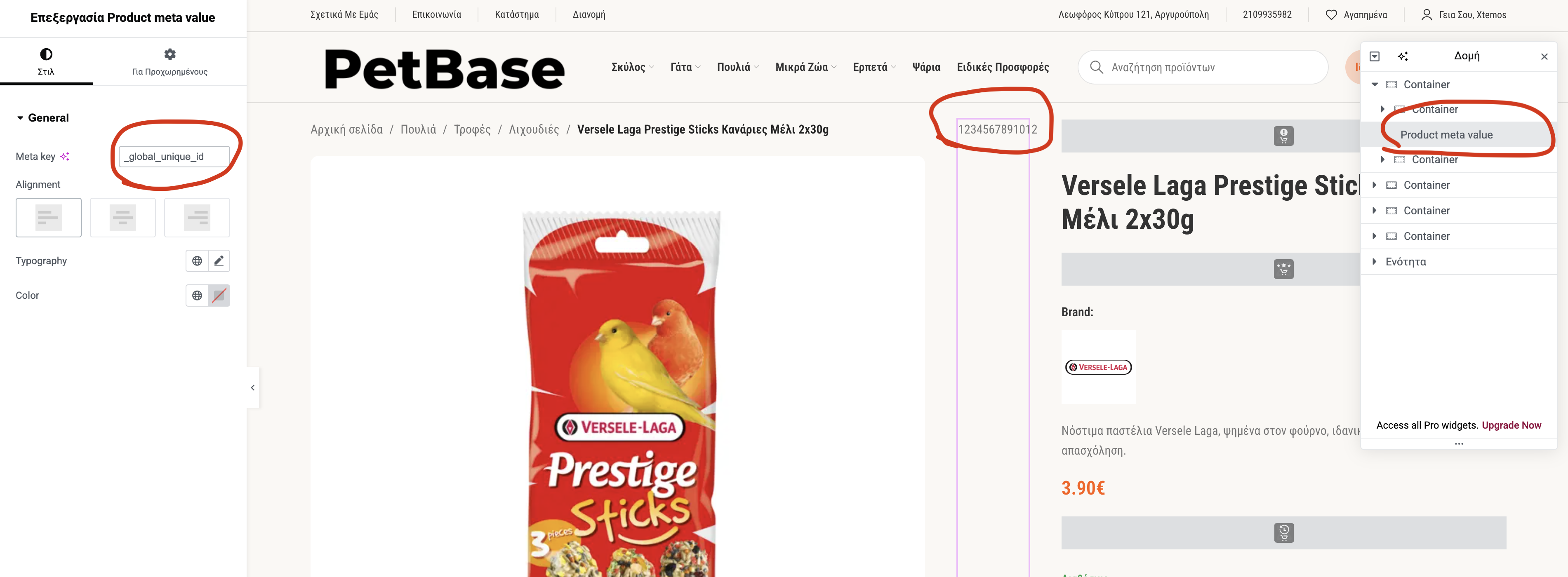
Kind Regards
December 31, 2025 at 1:17 pm #702802
thinkeasy.grParticipantHi,
Thank you for adding the output from the custom meta key
_global_unique_id.At the moment the value is printed without any label, so on the product page it appears like an empty “hole” (see attached screenshot). Could you please update the snippet so it outputs a label before the value (e.g. “EAN:” or “GTIN:”) and keeps the same formatting as the SKU line?
Ideal output:
EAN: 1234567891022Also, if the meta value is empty, please hide the entire line.
Thank you.
ThomasDecember 31, 2025 at 1:42 pm #702810You can add a label using a separate text element. Unfortunately, it is not possible to hide it if the meta value is empty.
-
AuthorPosts


- You must be logged in to create new topics. Login / Register