Remove Product Category Submenu
-
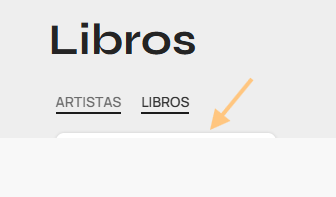
I am currently implementing my online shop and noticed an issue on the following page:
https://the-backstage.shop/categoria-producto/merch/libros/
I would like to remove the product category submenu displayed in the title section.
Additionally, the submenu appears underneath other elements and does not seem to respect the assigned z-index value.
Could you please guide me on how to remove this submenu from the title section and prevent it from appearing on product category pages?
Thank you!
Hello,
Sorry to say I am unable to see it on your site due to maintenance mode. You can remove the product category navigation from the page title in the theme settings:
Navigate to Dashboard > Theme Settings > Product Archive > Page title > Turn off the Categories in the page title option and save the settings.
This removes the category menu from the title section on the shop page and on all product category pages.
If you have any questions feel free to contact us.
Best Regards

 .

