
Home / Forums / WoodMart support forum / abiout the promotion grid.
Home › Forums › WoodMart support forum › abiout the promotion grid.
abiout the promotion grid.
- This topic has 10 replies, 2 voices, and was last updated 9 months, 1 week ago by
 Artem Temos.
-
AuthorPosts
-
January 18, 2026 at 9:50 am #704909
raeelioParticipanthow to design the megemenu like the demo?
Attachments:
You must be logged in to view attached files.January 19, 2026 at 5:42 pm #705118
Artem TemosParticipantHello,
Please refer to our documentation on how to create your mega menu dropdowns and manage your menus in general here https://xtemos.com/docs-topic/create-mega-menu/
Let me know if there is something you need help with.Kind Regards
January 21, 2026 at 4:34 am #705387
raeelioParticipantI’ve already created the mega menu, but I’m running into a few issues:
1, The search box is too wide and not centered. Could you help adjust it so it’s centered, like in my screenshot?
2, Where can I change the default (normal) color of the menu items? I’d like to change it to white.
3, Why is there an extra spacing/gap below the menu?
Attachments:
You must be logged in to view attached files.January 21, 2026 at 10:22 am #705433
Artem TemosParticipantHello,
1. To center the search box, you need to edit the header row containing the search and change the flex layout as shown on the screenshot
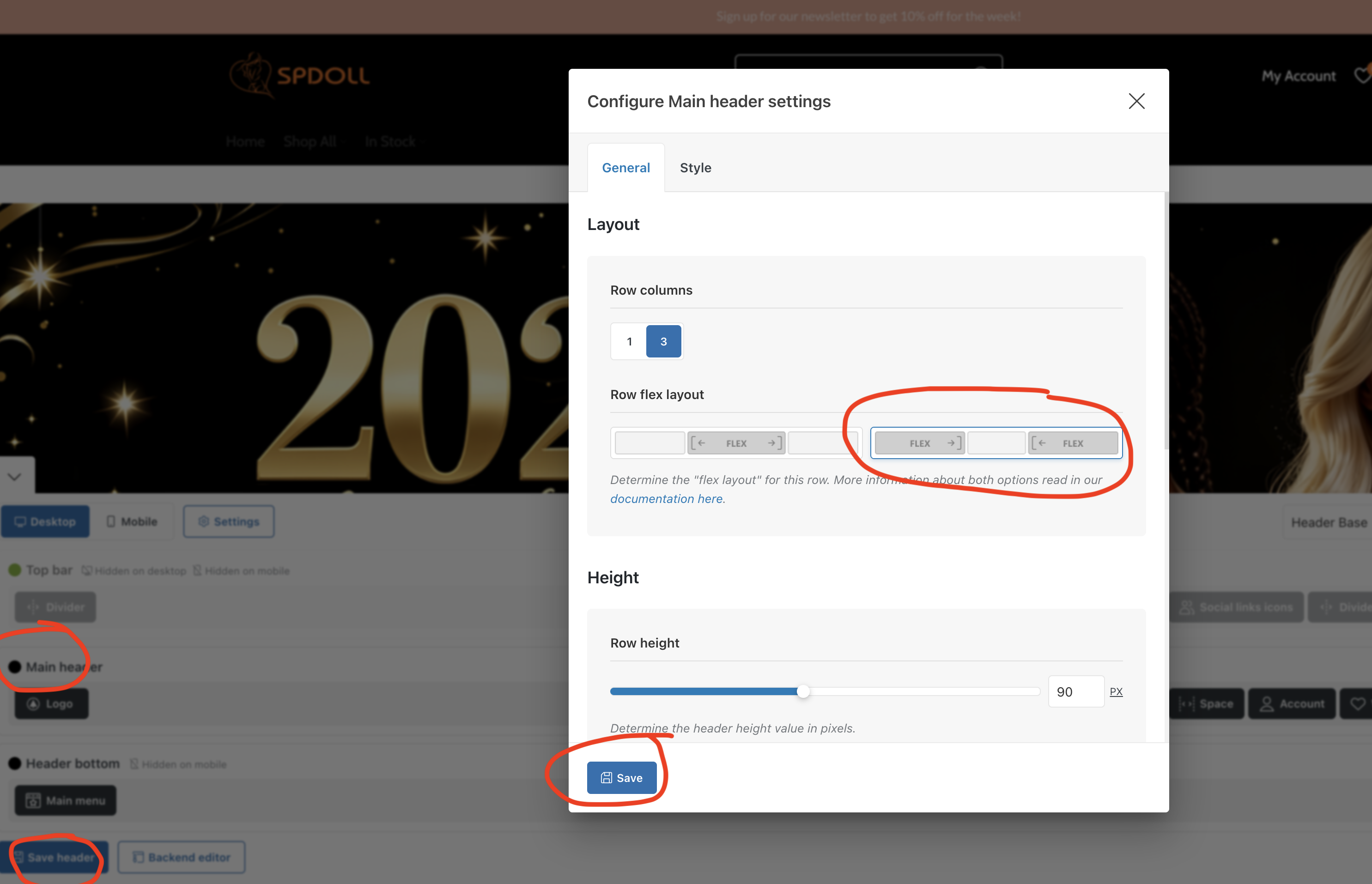
Read the instructions from the documentation https://xtemos.com/docs-topic/header-rows-flex-layouts/
2. You need to change the color scheme as shown on the video https://gyazo.com/cfa1898fe3990ef8d8708d8583cc0f7c
3. By default, our header has a margin-bottom and if you want to remove it on your home page, you can simply add a negative margin-top for the first row on the page with WPBakery page builder. So just set -40px, for example, to compensate for it.
Kind Regards
January 22, 2026 at 5:18 am #705566
raeelioParticipant“1. To center the search box, you need to edit the header row containing the search and change the flex layout as shown on the screenshot”
Not working, the setting is as the screenshot, but the search box is still very wider,
Attachments:
You must be logged in to view attached files.January 22, 2026 at 5:27 am #705568
raeelioParticipantand why the home slider’s upper has a white border, how to remove?
Attachments:
You must be logged in to view attached files.January 22, 2026 at 10:11 am #705593
Artem TemosParticipantAs I can see, you haven’t changed this yet https://gyazo.com/0455f9c7feff78c290343ad160234069
The white line is the border for the header’s last row. You can edit it as shown on the screenshot
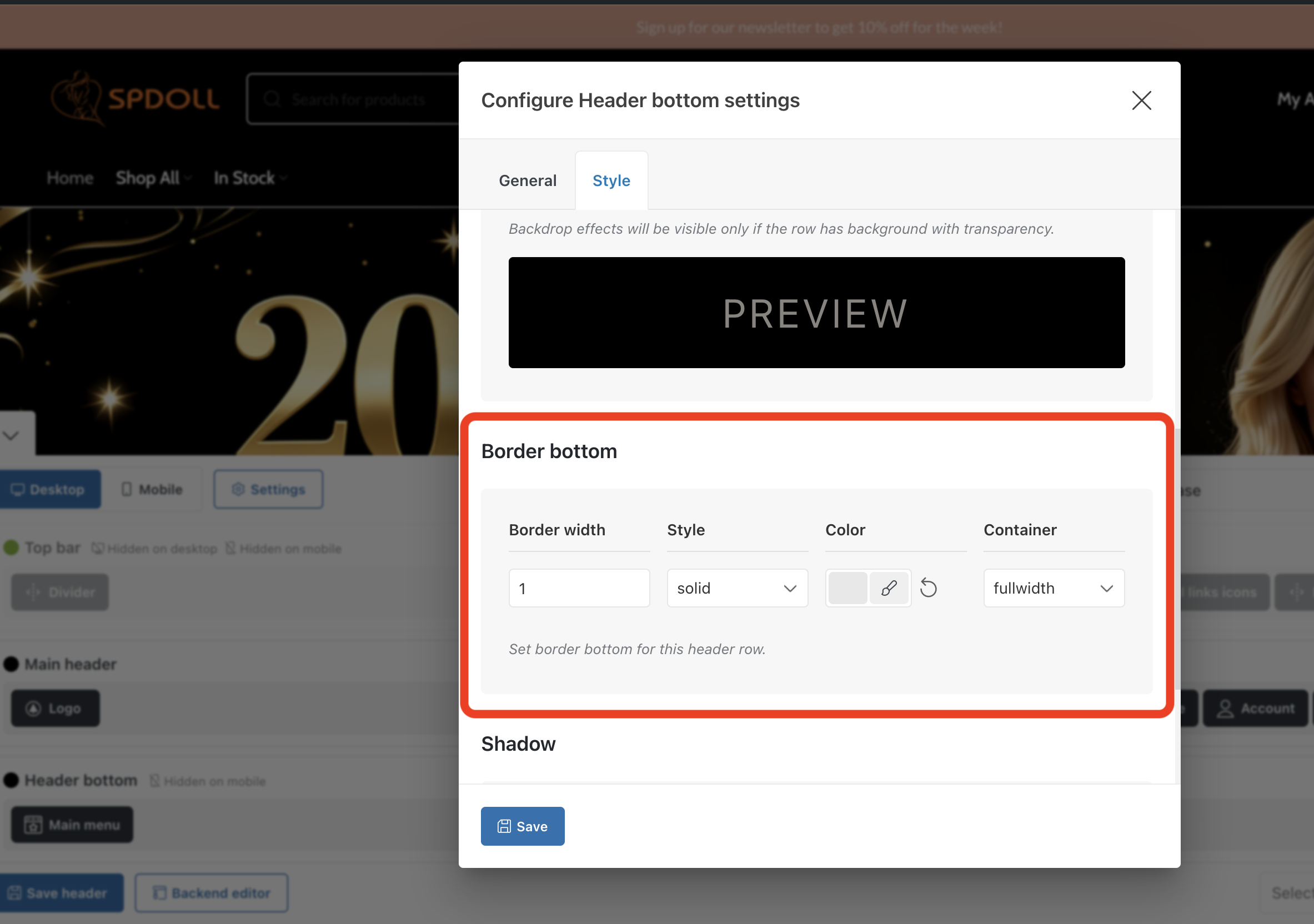 January 24, 2026 at 6:48 am #705882
raeelioParticipant“As I can see, you haven’t changed this yet https://gyazo.com/0455f9c7feff78c290343ad160234069”
maybe i do the wrong, can u help to adjust like the demo?
and setup radius=35px,
thanks.
Attachments:
You must be logged in to view attached files.January 24, 2026 at 10:10 am #705902
Artem TemosParticipantWe have changed the header layout for you. Please use the following code snippet to the custom CSS to increase the search size.
.wd-header-search-form {
    width: 700px;
    padding-left: 40px;
    padding-right: 40px;
}
January 24, 2026 at 11:26 am #705909
raeelioParticipantdone, thanks
January 27, 2026 at 9:58 am #706192
Artem TemosParticipantYou are always welcome. Feel free to contact us if you have any further questions.
-
AuthorPosts

The topic ‘abiout the promotion grid.’ is closed to new replies.
- You must be logged in to create new topics. Login / Register