
Home / Forums / WoodMart support forum / Gallery thumbsnails show the wrong image
Home › Forums › WoodMart support forum › Gallery thumbsnails show the wrong image
Gallery thumbsnails show the wrong image
- This topic has 12 replies, 3 voices, and was last updated 3 weeks, 5 days ago by
 Aizaz Imtiaz Awan.
-
AuthorPosts
-
November 23, 2025 at 7:50 pm #697316
mjdavid007ParticipantI hid the featured product image from the gallery, using this code provided on a different topic:
.screenshots .woocommerce-product-gallery .wd-carousel-wrap .wd-carousel-item:first-child{
display: none;
}It worked, but now, if I click the thumbnails of the gallery, they show the next image, not the right one (the one you clicked). Any tips on how to solve this?
November 24, 2025 at 1:37 pm #697418
Aizaz Imtiaz AwanKeymasterHello,
I’ve checked your site, and the product gallery is currently displayed as a carousel, not as a thumbnail gallery. Because of this, the thumbnail-click behavior you described doesn’t apply — the images are rotating inside the carousel layout instead of using individual clickable thumbnails.
If you have any questions feel free to contact us.
Best Regards,
November 24, 2025 at 8:27 pm #697493
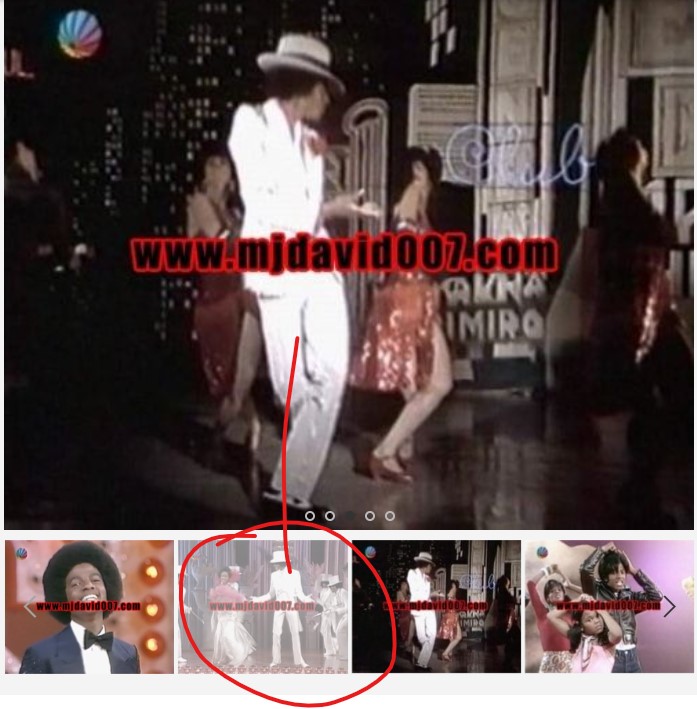
mjdavid007ParticipantHi! I’m not sure what you mean. The product pages have a gallery on them, just besides the Specification block, where there are thumbnails of the images that are clickable. But when you click on them, the image shown is not that one, but the next one. Check this screenshot, and see that the image shown is NOT the one highlighted below, but the following one.
-
This reply was modified 1 month ago by
mjdavid007.
November 25, 2025 at 10:33 am #697565
Aizaz Imtiaz AwanKeymasterHello,
Try to add the following custom css code in Theme Settings > Custom CSS:
.woocommerce-product-gallery .wd-carousel-item:first-child {
    opacity: 0;           /* visually hides the first image */
    pointer-events: none; /* prevents interaction */
    position: absolute;
}
Best Regards,
November 25, 2025 at 7:35 pm #697652
mjdavid007ParticipantThat didn’t work, because it hides the main product image from the top and besides, the problem was still happening with the thumbnails.
November 26, 2025 at 10:14 am #697713
Aizaz Imtiaz AwanKeymasterHello,
For this you need to add some code customization. Please follow this guide:
https://wpsites.net/genesis-tutorials/remove-woocommerce-single-thumbnail-images-from-product-details-page/,https://stackoverflow.com/questions/44732859/remove-featured-image-from-the-woocommerce-gallery
Hope this Helps!
Best Regards,
November 26, 2025 at 4:57 pm #697830
sincere3168ParticipantI encountered the same problem as him, when I selected one of the product thumbnails, the large image on the right actually showed the last two. I disabled all plugins and the problem still persists.
November 27, 2025 at 12:16 am #697884
mjdavid007ParticipantCan you advise a bit further on where to apply that php code?
November 27, 2025 at 1:20 pm #697961
Aizaz Imtiaz AwanKeymasterHello,
You can add the php code in the function.php of the child theme.
For more guidance, please follow this guide:
https://wpsites.net/genesis-tutorials/remove-woocommerce-single-thumbnail-images-from-product-details-page/
https://stackoverflow.com/questions/44732859/remove-featured-image-from-the-woocommerce-galleryBest Regards,
December 1, 2025 at 12:01 am #698431
mjdavid007ParticipantI have inserted this code:
// Source – https://stackoverflow.com/a
// Posted by LoicTheAztec, modified by community. See post ‘Timeline’ for change history
// Retrieved 2025-11-30, License – CC BY-SA 3.0add_filter(‘woocommerce_single_product_image_thumbnail_html’, ‘remove_featured_image’, 10, 2);
function remove_featured_image($html, $attachment_id ) {
global $post, $product;$featured_image = get_post_thumbnail_id( $post->ID );
if ( $attachment_id == $featured_image )
$html = ”;return $html;
}But still, nothing happens…
December 1, 2025 at 10:32 am #698480
Aizaz Imtiaz AwanKeymasterHello,
Sorry to say such a modification requires complicated WooCommerce code customization, which is not covered by our support.
Hope you can understand!
Best Regards,
December 1, 2025 at 11:05 am #698490
mjdavid007ParticipantI purchased the extra support only to fix this feature…
December 1, 2025 at 3:19 pm #698562
Aizaz Imtiaz AwanKeymasterHello,
Sorry, but there is no option in the theme settings available for that.
It requires customization, and this is beyond our limitations and support policy.Best Regards,
-
This reply was modified 1 month ago by
-
AuthorPosts


- You must be logged in to create new topics. Login / Register