Home Forums WoodMart support forum Post Archive layout

Post Archive layout

Viewing 4 posts - 1 through 4 (of 4 total)
  • Author
    Posts
  • #709790

    patrick.bek
    Participant

    Hello Woodmart Support Team,

    I am experiencing an issue when trying to create a Post Archive layout.

    Here are the steps I followed:

    I went to Settings → Reading and assigned the page I created as the Posts page (Blog page).

    To rule out plugin conflicts, I temporarily disabled all non-essential plugins.

    Elementor is updated to the latest version.

    Woodmart theme is updated to the latest version.

    Now, when I go to:

    Layouts → Add New → Post Archive Layout

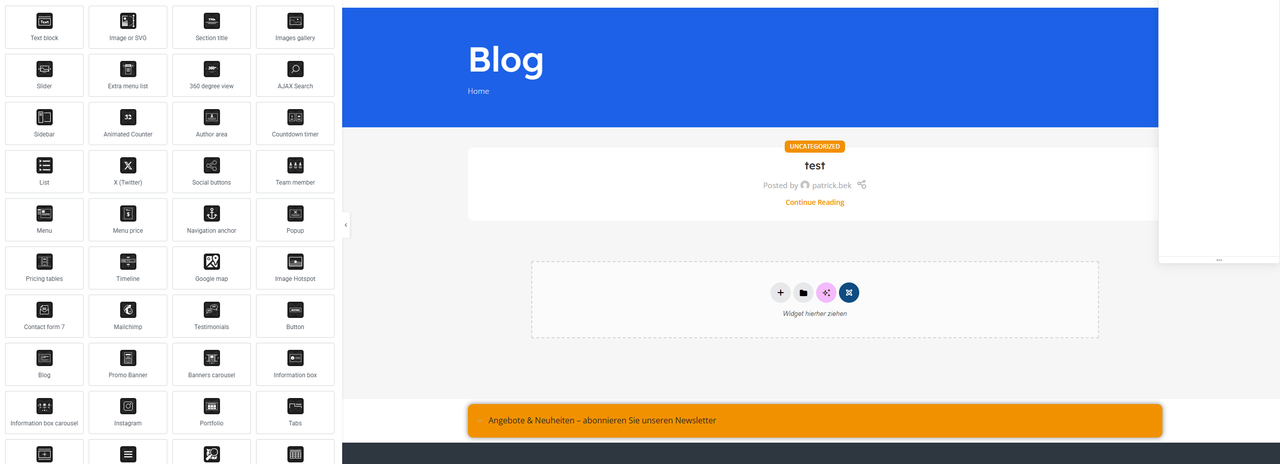
    and select the page, then click Edit, the layout does not load.
    The editor opens, but the page is completely blank.
    The predefined layout template does not appear.

    I have attached a screenshot showing the issue.

    Here is the link to the page:
    [PLEASE INSERT YOUR LINK HERE]

    Could you please let me know:

    If I am missing a required setting?

    If this is a known issue?

    Or if there is a conflict specific to Post Archive layouts?

    Thank you in advance for your support.

    https://i.postimg.cc/MTy6wMHp/Screenshot-2026-02-24-181305.png

    #709833

    Artem Temos
    Keymaster
    Xtemos team

    Hello,

    Thank you so much for purchasing our theme and contacting our support center.

    Could you please disable all plugins that are not related to our theme and provide us your admin access so we can check it?

    Thank you in advance

    #710231

    patrick.bek
    Participant

    Of course, here are the login details.

    #710232

    Artem Temos
    Keymaster
    Xtemos team

    As we can see, this functionality works as expected. Here is a screenshot https://gyazo.com/b3507fcfb65d746c28df90242bcabb5c
    The layout contains a page title and a post loop. But since you have only one blog item, you see it as almost empty.

Viewing 4 posts - 1 through 4 (of 4 total)