
Home / Forums / WoodMart support forum / Translate cookies block
Home › Forums › WoodMart support forum › Translate cookies block
Translate cookies block
- This topic has 7 replies, 2 voices, and was last updated 2 years, 1 month ago by
 Aizaz Imtiaz Awan.
-
AuthorPosts
-
September 24, 2024 at 9:47 am #599585
edgarskairansParticipantHello,
please advise how to translate the text block ‘Cookies’ ‘We use cookies to improve your experience on our website. By browsing this site, you agree to the use of cookies”. ( check photo)
Thanks
Best Regards.Attachments:
You must be logged in to view attached files.September 24, 2024 at 2:49 pm #599710Hello,
You can change this text in Theme Settings -> General -> Cookies law info.
Best Regards
September 24, 2024 at 3:09 pm #599724
edgarskairansParticipantHello,
If I change, it changes for all languages
Thanks
Best Regards.September 24, 2024 at 4:10 pm #599757Hello,
Sorry to hear about the inconvenience. Kindly, please share your Site WP-ADMIN Login details in the Private Content field so that we can check this concern on your Site and help you out accordingly.
Best Regards
September 24, 2024 at 4:44 pm #599766
edgarskairansParticipant+ info
September 25, 2024 at 10:54 am #599929Hello,
Your issue has been solved. I have translated the words from the WPML >> String Translation section. Please check the site now after removing the browser cache.
Best Regards.
September 25, 2024 at 11:05 am #599932
edgarskairansParticipantHello,
Thank you, it’s working. What was the issue? I went to ‘WPML >> String Translation,’ but it didn’t help me.
Most likely, I’ll be building another website on your theme, so it would be good to know what the problem was so I don’t have to reach out to you again.
Thanks
Best Regards.September 25, 2024 at 2:37 pm #600046Hello,
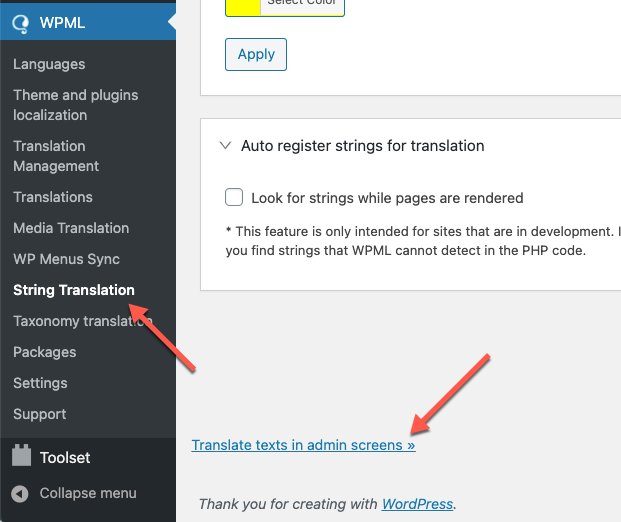
Some words are not added in the string translation section. If you will not find any words, then Please go to WPML >> String Translation >> Click the scroll to the bottom of the page and click the Translate texts in admin screens link. https://cdn.wpml.org/wp-content/uploads/2021/03/translate-texts-in-admin-screens.png
This will take you to a searchable list of admin strings. Find the Words that you want to translate and then select those words and add them to the string Translation then you will go to the WPML >> String Translation >> then find and translate them into other languages.
Best Regards
-
AuthorPosts


- You must be logged in to create new topics. Login / Register