
Home / Forums / WoodMart support forum / Unable to Place Orders Due to Billing Field Errors
Home › Forums › WoodMart support forum › Unable to Place Orders Due to Billing Field Errors
Unable to Place Orders Due to Billing Field Errors
- This topic has 9 replies, 2 voices, and was last updated 5 months, 3 weeks ago by
 Artem Temos.
-
AuthorPosts
-
April 1, 2026 at 5:19 pm #714810
perfumeaddicts22ParticipantI am experiencing an issue while trying to place an order on my WooCommerce store. When I enter the required details such as first name, last name, district, address, and mobile number, the order is not being placed. Instead, I receive the following warning messages:
Billing Your name is a required field.
Billing Your address is a required field.
Billing Your mobile number is a required field.
I have already tried deactivating all plugins to check if any of them were causing the issue, but the problem persists even after deactivating them. This confirms that the issue is not caused by any plugin conflict.
Next trail, I have tried to switch the theme to default / Astra theme, and there the checkout page works perfectly.
This means, that there is some problem in the theme itself.I urgently need a solution as I planned to run a sales ad today, but this issue is preventing customers from placing orders. Could you please check and fix this as soon as possible?
Looking forward to your quick response.
Theme Woodmart, Elementor pro
https://www.perfumeaddicts.in/checkout/
screenshot of the error is here: https://snipboard.io/HyvBb3.jpg
Please help.. very very urgent!
Attachments:
You must be logged in to view attached files.April 2, 2026 at 6:34 am #714842
perfumeaddicts22ParticipantHello Authorised support Team,
Can someone please take a look at the site. top urgent! Our customers are not able to place orders!
Please! help here!
We need urgent support!Please!
April 2, 2026 at 11:07 am #714876Hello,
Could you please temporarily turn off all the plugins that are not related to our theme and switch to the parent theme in Appearance -> Themes? Test how it works and let me know if this helps.
Kind Regards
April 2, 2026 at 12:10 pm #714891
perfumeaddicts22ParticipantHi, What does it mean by parent theme? Do you mean Default theme? or
Otherwise, I have shared the admin credentials, can you do it?April 2, 2026 at 1:23 pm #714899
perfumeaddicts22ParticipantCan you pls expedite the reply… please. I have already raised it that we need urgent solution..
Please try to understand reply promptly.April 2, 2026 at 2:22 pm #714910As we can see, you have the WoodMart child theme active in Appearance -> Themes. Switch to the WoodMart parent theme and keep all plugins temporarily turned off. Test how it works and let us know.
April 2, 2026 at 5:12 pm #714932
perfumeaddicts22Participanthi, We have all plugins temporarily turned off. Switched to the Woodmart main theme.
But still problem is the same!
Can you pls look into the matter! urgently.
I have attached the error screenshot.You have admin login, please login and do the needful.
attaching again here with in private content.Attachments:
You must be logged in to view attached files.April 2, 2026 at 5:20 pm #714934Currently, I can post the order but get an error about the payment method https://gyazo.com/20e4babc474d7ba241f10fbdab96ded7
So it looks like there is no problem you showed in the screenshot. Could you please try to test it in a different browser?April 2, 2026 at 7:44 pm #714946
perfumeaddicts22Participant1. Please check without login (not as a any registered user).
Secondly Razorpay plugin was deactivated.Now I have reactivated two plugins – 1. Razorpay 2. Woodmart core.
Please check the recording https://go.screenpal.com/watch/cOfnDpnTpwRi have tried on different browser as well. same problem!
I think, kindly try!
awaiting .Please try it as the earliest. as we are not getting any orders.
/Jeetendra
April 3, 2026 at 9:27 am #714976Hello,
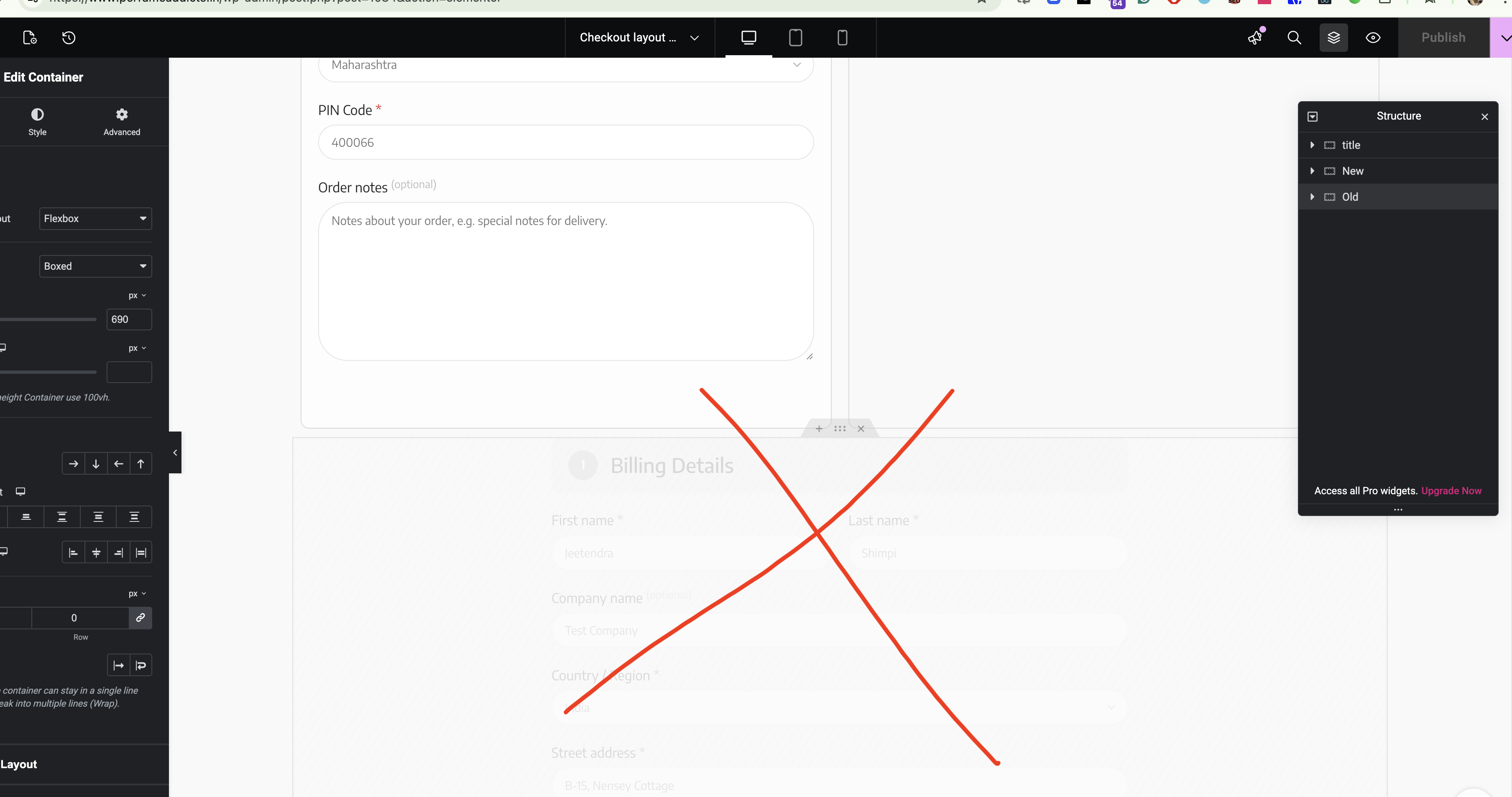
To fix this issue, you need to remove the duplicated checkout form from the custom layout in Dashboard -> WoodMart -> Layouts.
Kind Regards
-
AuthorPosts


Tagged: Billing Field Errors
- You must be logged in to create new topics. Login / Register