WordPress blog

Version 8.5 includes numerous improvements to frontend page loading performance. The primary issue we aimed to address was render-blocking requests, which negatively impact both FCP (First Contentful Paint) and LCP (Largest Contentful Paint).
Key changes implemented in this update:
- Reduced the main CSS file size by 30%, from 46.5 kB to 32.7 kB.
- Inlined small CSS files directly into the HTML.
- Streamlined asset delivery with improved render-blocking time.
- Deferred non-critical CSS to optimize loading priority.
- Inlined font connections within the HTML to improve the network dependency tree.
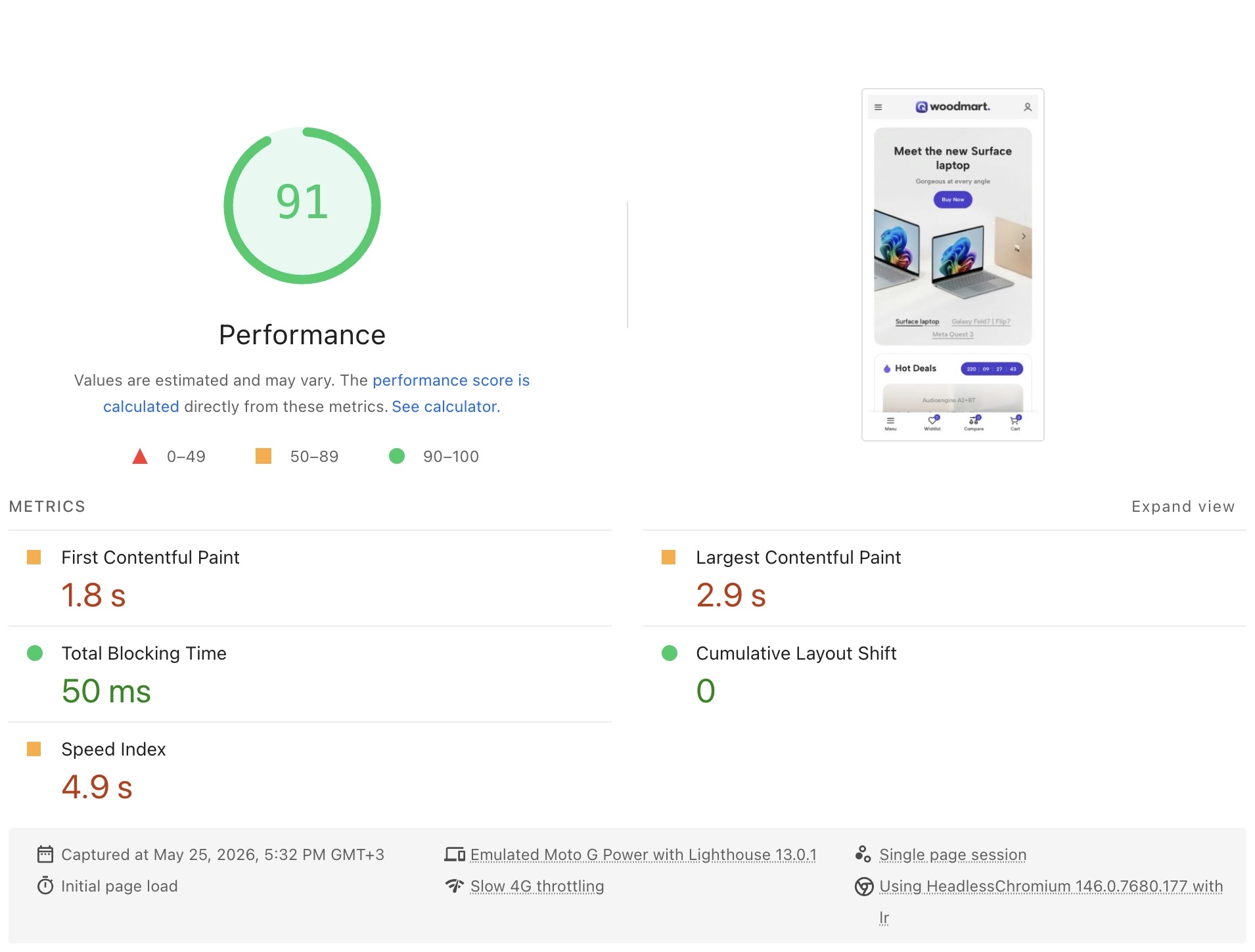
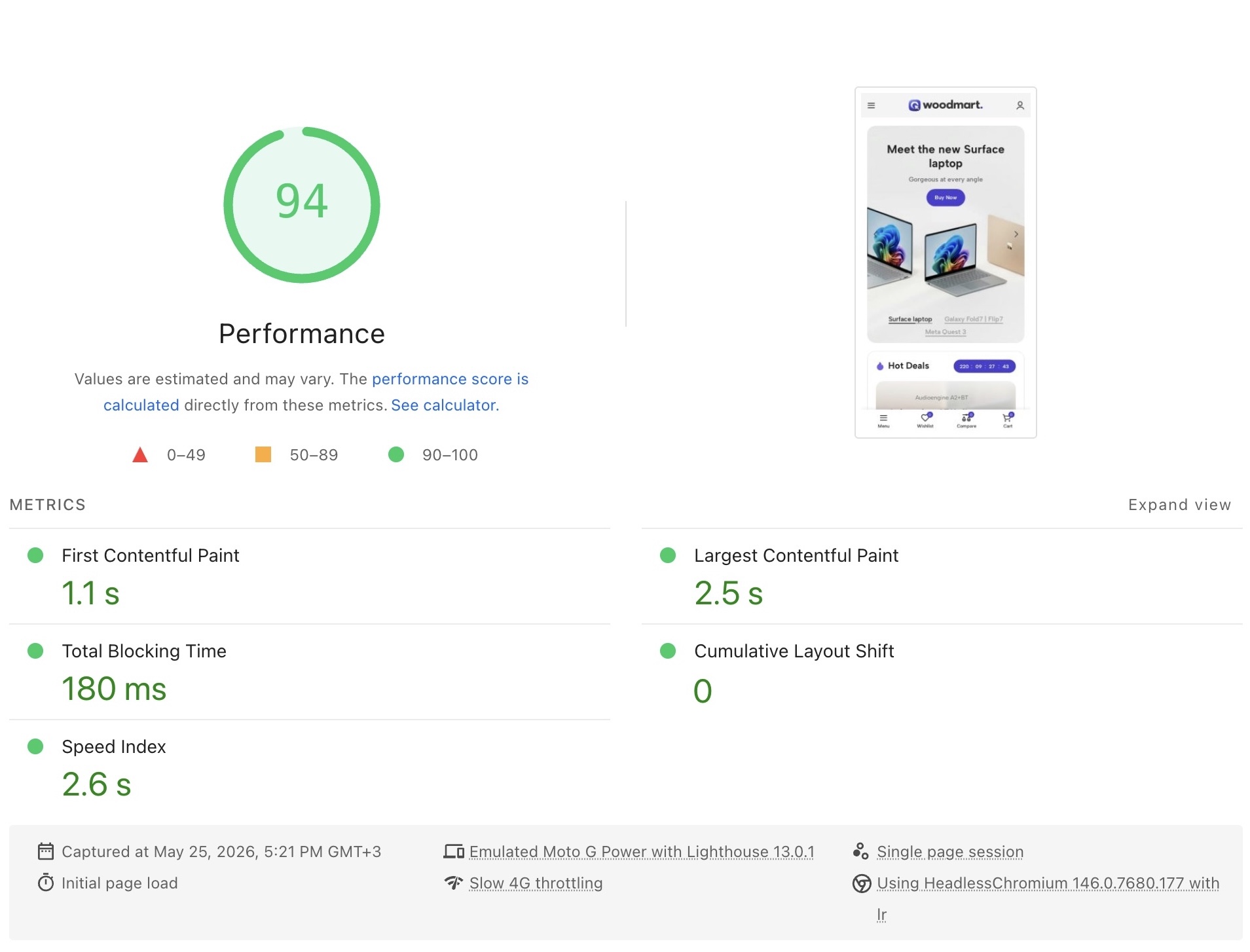
Comparative reports show improvements in FCP and LCP metrics, using the Electronics 3 demo page as an example:
CSS size reduction
Core CSS assets, including global base styles (base.css), header-specific stylesheets (header.css), and theme-integrated WooCommerce styles (woocommerce-base.css), have been significantly refactored to improve baseline performance. File sizes for these essential, site-wide assets have been reduced by removing legacy CSS rules inherited from WoodMart versions prior to 6.0, as well as by offloading specific styles into individual modules that now only load under required conditions. Furthermore, non-critical styles that are not required for initial rendering have been separated from the core files and moved to a deferred loading queue. This ensures that the minimum CSS payload remains as lightweight as possible, leading to faster initial connection times and improved site performance.
Inline small CSS files into HTML
In the Woodmart theme, styles are split into multiple small CSS files to ensure that only the styles required for the elements present on a specific page are loaded. While these stylesheets benefit from browser caching, the overhead of individual HTTP requests for such small files is often inefficient. To address this, we have implemented the native WordPress resource handling mechanism. We have leveraged this built-in functionality based on performance testing conducted by the WordPress core team, which confirmed that utilizing this native approach significantly optimizes connection priority within the network dependency tree.
When a page is rendered, the stylesheets selected for inlining are added to an array. You can configure the total size limit for these files using the “Inline styles size limit” option. The system then proceeds to inline these resources, starting from the smallest file and moving to the largest until the specified size limit is reached.
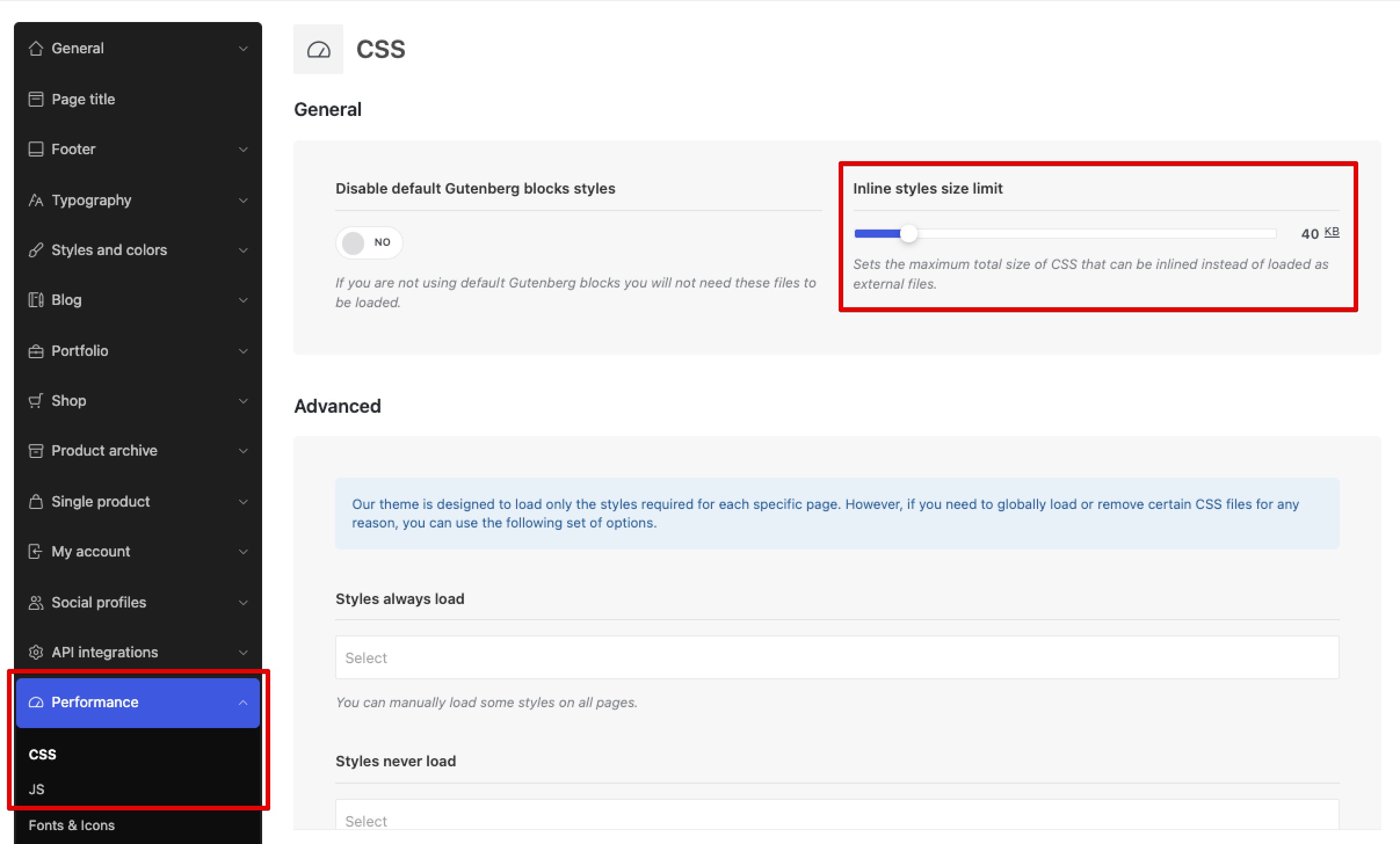
Example: If a page contains 30 stylesheets of 1 KB each, and you set the “Inline styles size limit” to 20 KB, only the first 20 files will be converted from <link rel="stylesheet"/> tags into <style> blocks. Once the 20 KB limit is reached, the inlining process stops. The remaining 10 stylesheets will continue to function as external <link> elements.
While inlining 100% of the CSS might maximize performance for first-time visitors, it can negatively impact returning visitors. When CSS is loaded via external files, returning visitors benefit from browser caching. Conversely, if all CSS is inlined, both new and returning visitors must re-download the entire CSS payload on every page load.
It is necessary to measure the impact of increasing the inline CSS limit on LCP for both initial and repeat page loads. This analysis was performed (source) in #63018. Benchmarks conducted under conditions simulating broadband or fast 4G connections show that results are similar:
- Returning visitors: Page load time increases linearly as more CSS is inlined.
- First-time visitors: Page load time decreases with an exponential decay as more CSS is inlined.
The point at which the exponential decay reaches a point of diminishing returns is when the page size is about 40 KB.
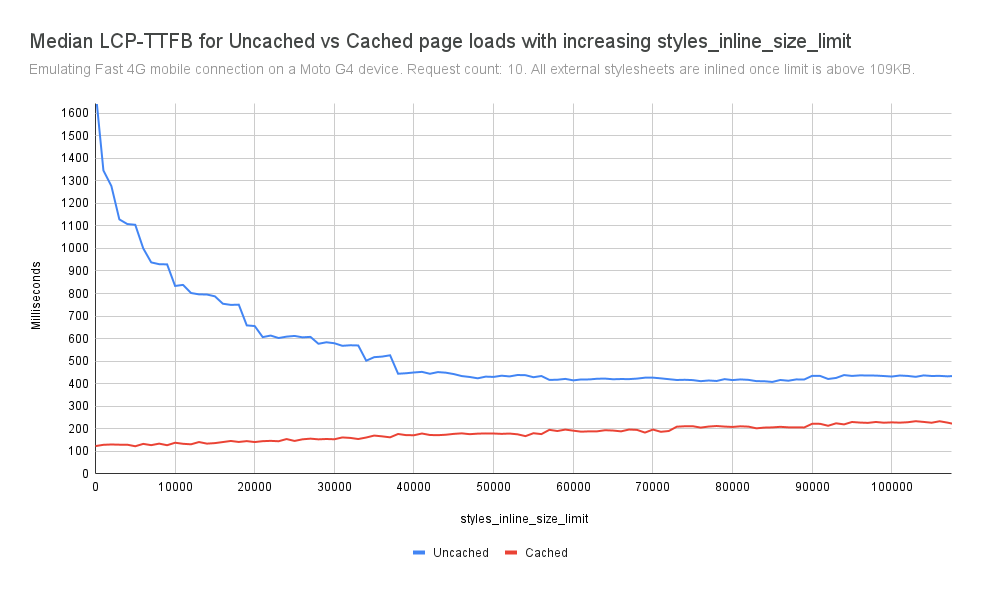
Consequently, the percentage improvement for first visits is greater than the percentage regression for repeat visits, and the absolute improvement for first visits (-205.8 ms) is much larger than the absolute regression for repeat visits (+30.3 ms).
Streamlined Asset Delivery: CSS Injection
While the theme previously employed a modular system to load only the CSS required for a specific page, these styles were historically enqueued in the site header. The updated architecture refines this process by transitioning to location-aware delivery model. Styles are now injected directly into the DOM exactly where the corresponding element is rendered. This eliminates render-blocking requests by ensuring that stylesheets are no longer dependent on the head section, allowing critical styles to be processed and applied immediately as the page parser encounters each component. This transition provides several technical advantages:
- Reduced Critical Path: The browser no longer needs to wait for a massive global stylesheet to be fully downloaded before it can start displaying elements. As the HTML is streamed and parsed, the associated styles are applied immediately.
- Minimized DOM Blocking: Because these styles are linked in close proximity to their target elements, the “blocking” period is reduced. The browser can prioritize rendering the most important visual elements (like headers, hero sections, and product grids) while the rest of the page assets follow.
These refinements happen automatically upon updating to WoodMart 8.5. You do not need to manually configure your blocks or layouts; the theme now manages the link attributes for all core elements during the rendering process. However, if you encounter any style conflicts, please ensure that you have cleared your cache. If the issue persists, please start a new topic on our support forum so that we can assist you as soon as possible.
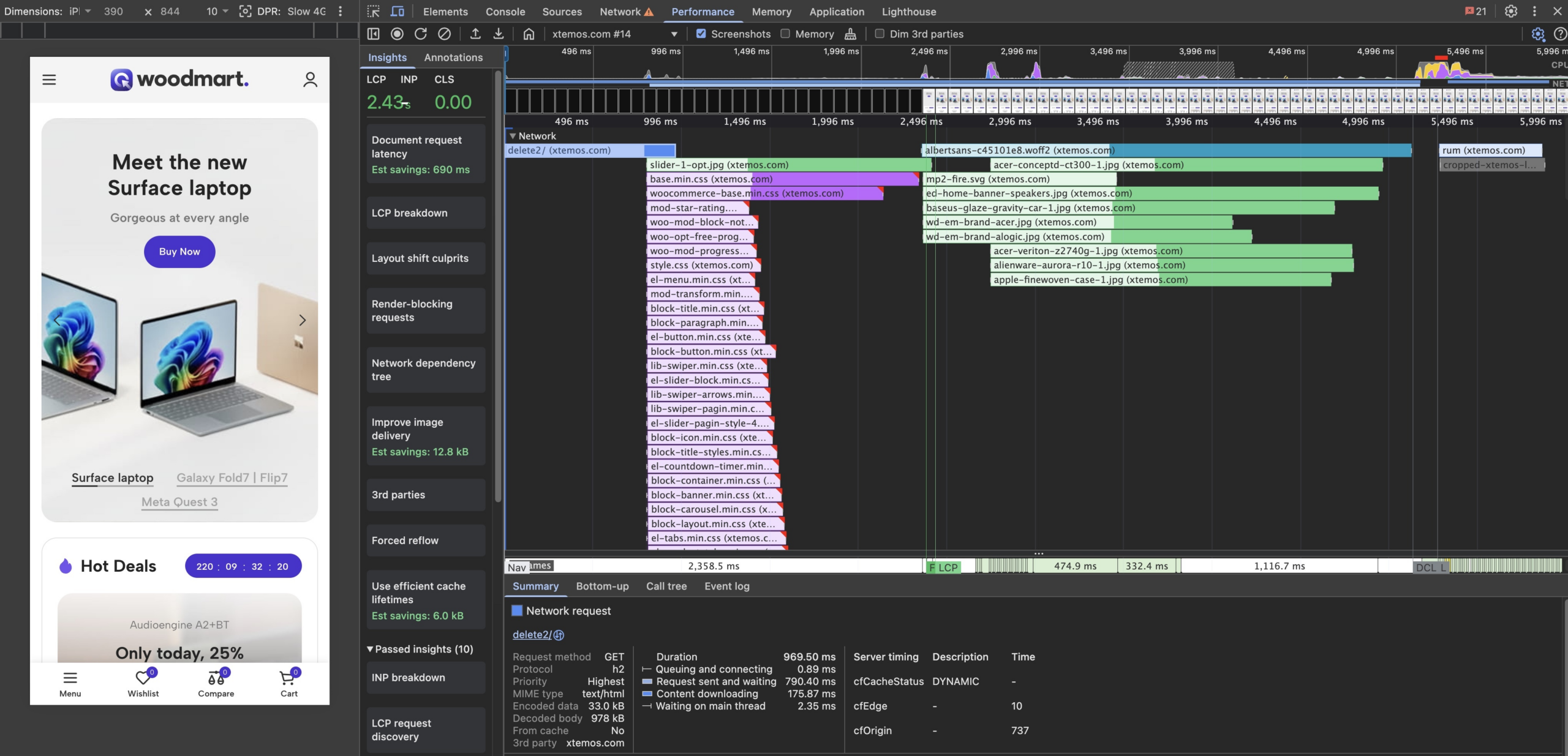
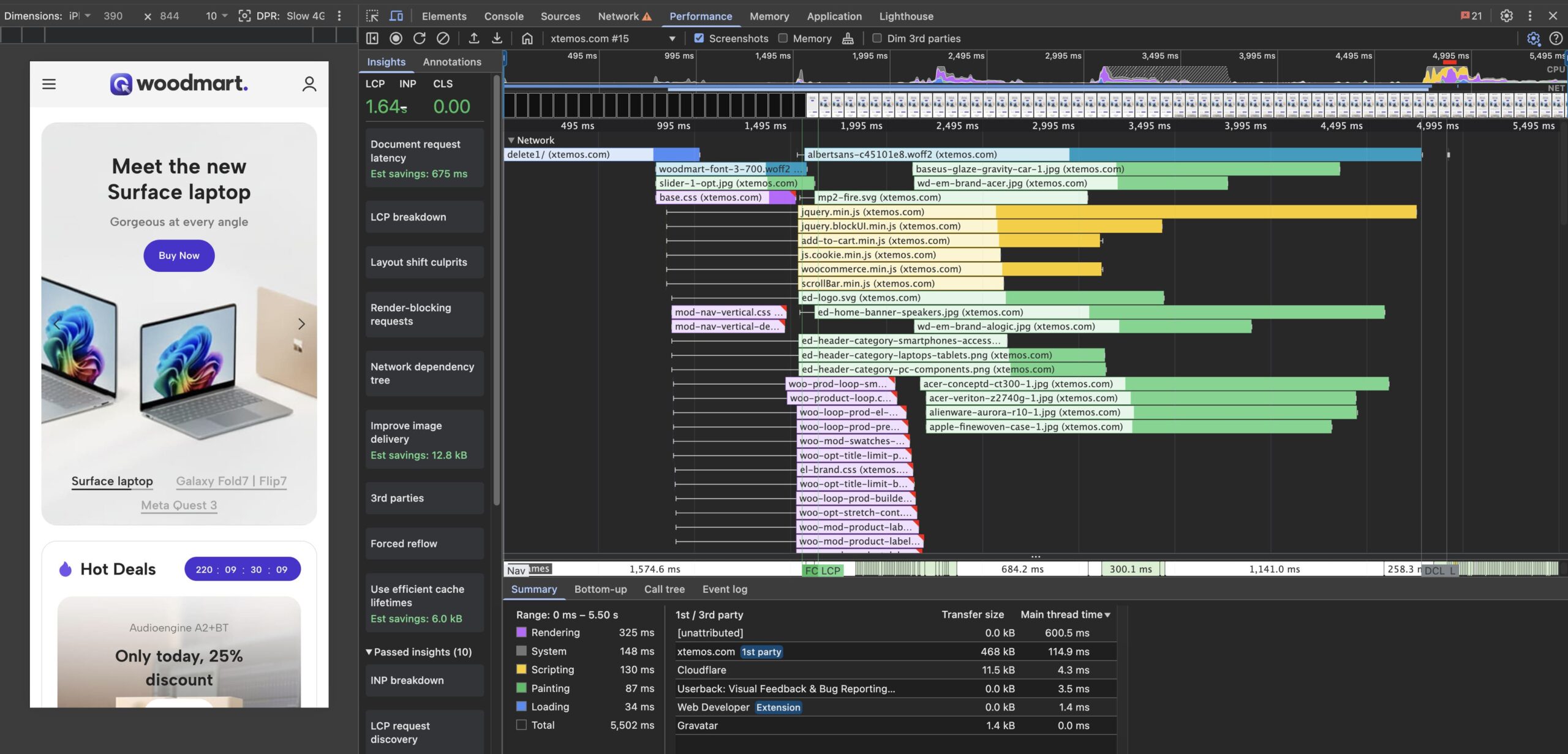
Here is a comparison showing how optimizing CSS bundling and the file loading sequence significantly improved LCP performance:
Deferred CSS Loading
In addition to the immediate, proximity-based style injection, WoodMart 8.5 introduces a sophisticated deferred loading mechanism for non-critical styles. This is a crucial step in ensuring that your store feels instantaneous to the end user by eliminating unnecessary wait times during the initial page load.
Not every element on your page needs its styles applied at the exact millisecond the browser starts rendering. Complex interactions like hover effects on deep-nested menu items, secondary animations in the footer, or specific styling for elements located “below the fold” do not need to block the initial paint. We have implemented an mechanisme that deprioritize these secondary styles and delays their execution. The theme now prioritizes the CSS rules required to display the “above-the-fold” content immediately, while non-critical styles are categorized and held back.
These deferred styles are injected into the page in a way that they only load after the browser has finished rendering the main content. By offloading these assets to the very end of the document loading process, we effectively remove them from the critical rendering path. This allows the browser to dedicate its full processing power to the elements your visitor sees the moment they land on your site, rather than forcing it to download and parse the entire theme’s library upfront.
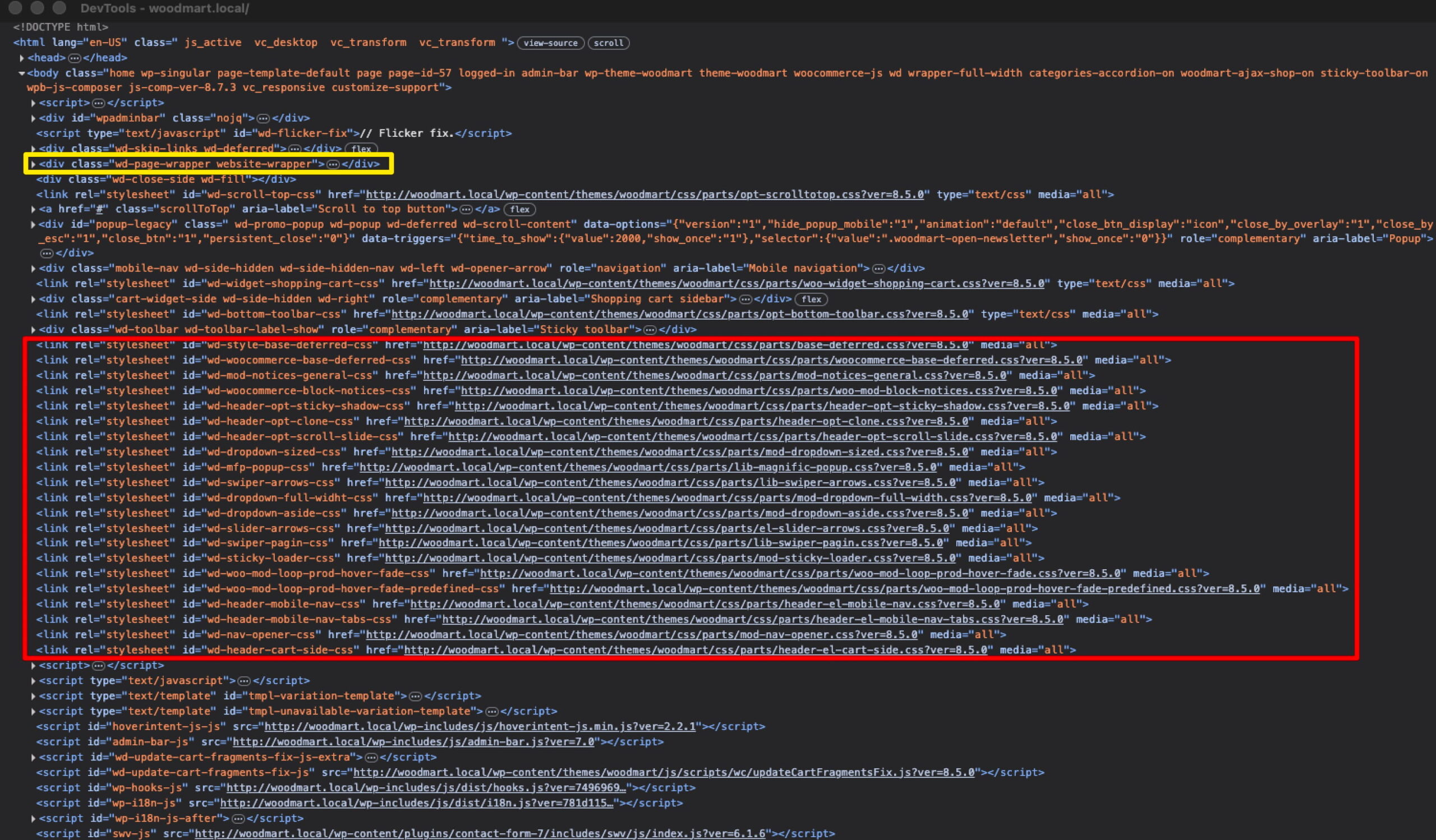
Because the browser is not forced to process every single line of CSS in the theme before it draws the first pixel, the content appears on the screen much sooner. As the page finishes loading, the deferred styles are applied seamlessly. The following is an example of deferred stylesheets loaded after the main content (wd-page-wrapper) to avoid blocking the initial page render:
Inlined font connections
Regarding font loading, local Google Fonts are now processed and enqueued directly inline within a dedicated style tag rather than being loaded through external stylesheets. By embedding these font declarations within the HTML document structure, the theme eliminates the overhead of additional network requests that are typically required to fetch external CSS files before the browser can begin downloading the font files themselves. This integration streamlines the initial render process, significantly reducing latency in the critical path and ensuring that typography assets are processed as an intrinsic part of the document parsing sequence.
Summary
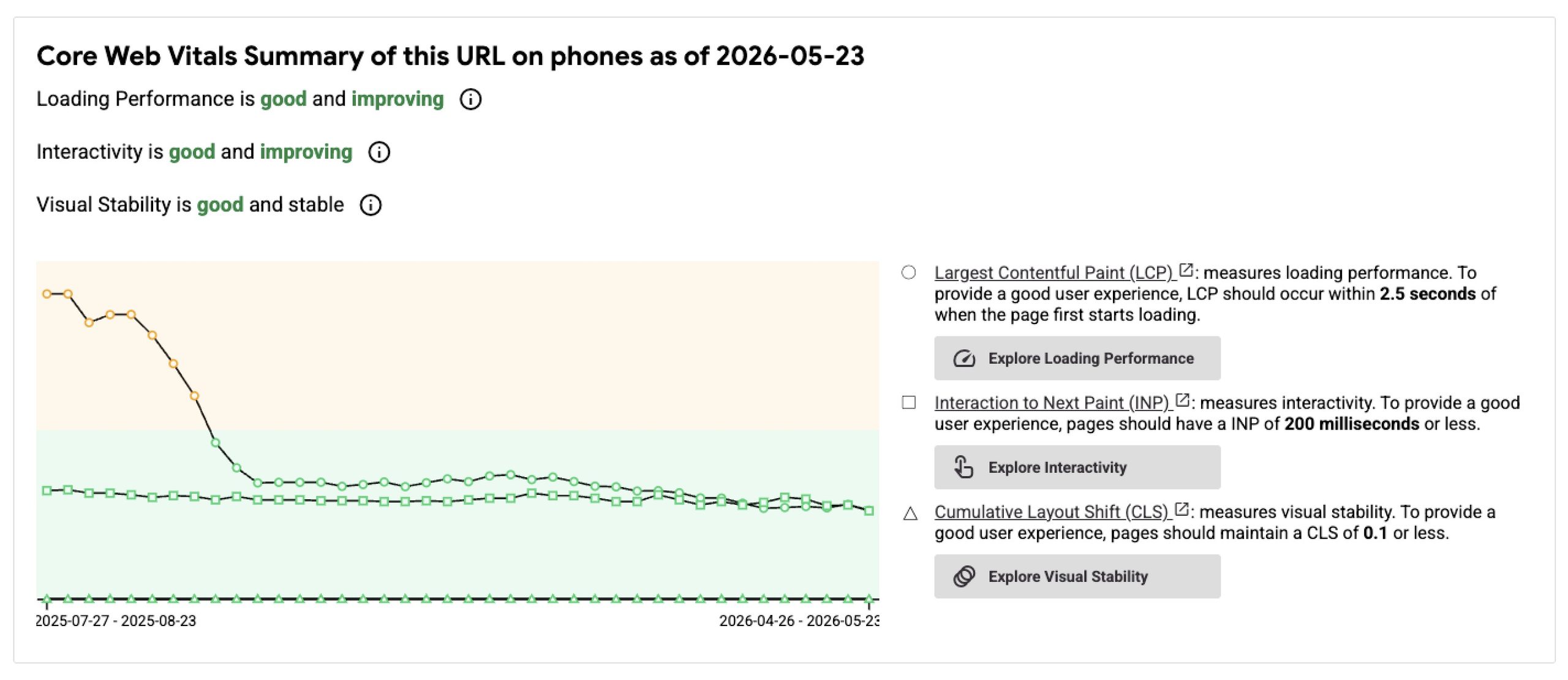
As a result, by combining all the techniques described above — both those introduced in this update and those from previous ones — we have been able to significantly and consistently improve the performance of the WoodMart theme. Our approach has been twofold: in the previous major release (v8.4.0), we implemented extensive optimizations to reduce Cumulative Layout Shift (CLS) and improve overall rendering stability. In this current update (v8.5.0), we have shifted our focus to CSS architecture, refactoring core stylesheets and implementing conditional, deferred loading to eliminate render-blocking resources.
The impact of these cumulative efforts is clearly visible in the following graph, which tracks the Core Web Vitals optimization for our primary demo page over the past 10 months. You can see two distinct “steps” of improvement: the first corresponds to our LCP and layout stability enhancements in version 8.4.0, followed by a secondary boost in performance metrics achieved through the refined CSS and font loading strategies introduced in this update.