
Home / Forums / WoodMart support forum / Apple Pay button is just spinning but not displaying
Home › Forums › WoodMart support forum › Apple Pay button is just spinning but not displaying
Apple Pay button is just spinning but not displaying
- This topic has 22 replies, 3 voices, and was last updated 5 years, 10 months ago by
 Artem Temos.
-
AuthorPosts
-
August 20, 2020 at 1:13 pm #220060
BambuidkParticipantHi there
I have trouble fixing the Apple Pay button.
I have been in contact with Stripe and woocommerce – and there are both saying that I should contact you “Xtemos”, because i try in staging mode to change the theme to a standard wordpress theme and it worked fine.Can you please help?
Best regards
EmilAttachments:
You must be logged in to view attached files.August 20, 2020 at 9:53 pm #220151
Elise NoromitMemberHello,
Please disable AJAX add to cart in the Theme Settings > Product page and check the issue again.
Best Regards
August 21, 2020 at 5:54 am #220182
BambuidkParticipantHi thank you for the reply.
I have try that – but it still don’t work.Best regards
EmilAugust 21, 2020 at 7:49 am #220213OK, how exactly can we see the button on your product page? We have an iPhone with Apple Pay configured but still don’t see the button https://gyazo.com/27d9801ad4b651150b4db7f3262eea09
August 21, 2020 at 8:06 am #220217
BambuidkParticipant…
August 21, 2020 at 8:12 am #220223We just tested this on your website and the button is working correctly. When we press it, we get an Apple Pay prompt window to proceed with the payment. https://gyazo.com/dd2be71e4c6b294af0d9af893493bb70
August 21, 2020 at 8:25 am #220227
BambuidkParticipantYes it works fine with products that is not a variable product.
It doens’t work with products that have variables.Will you please try that to.
Thank you.
August 21, 2020 at 8:27 am #220231Yes, we tested the variable product (it is shown on the screenshot).
August 21, 2020 at 10:11 am #220262
BambuidkParticipantI can’t open the screenshot. Which product have you tried with?
And can you pleae tell me which phone you are using?August 21, 2020 at 11:16 am #220284We have tested
3/4 Bambus T-shirt – Sortwith iPhone X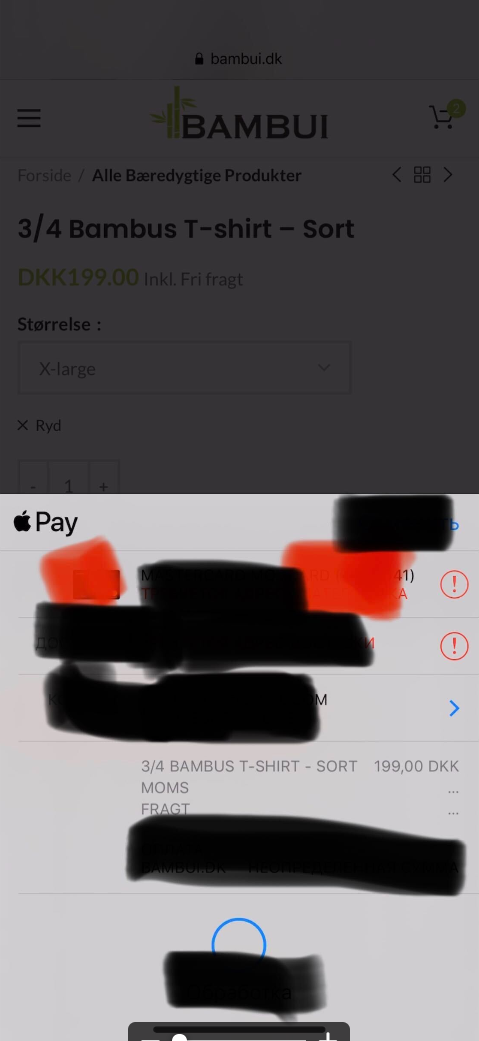 August 21, 2020 at 11:18 am #220285
BambuidkParticipantOkay – as I can see it works fine for me to now.
But it didn’t work yesterday 😀Can you tell me what the problem could be?
Best regards
EmilAugust 21, 2020 at 11:20 am #220287
BambuidkParticipantNow I tried in an incognito browser (Safari) – and it doens’t work.
Can you please try the same product in an incognito browser?Thank you.
August 21, 2020 at 11:27 am #220290
BambuidkParticipantAnd please try it on the original website: http://www.Bambui.dk
August 21, 2020 at 12:04 pm #220309Yes, it always spinning when you select some variation. Please, disable all external plugins and send us your admin access
August 21, 2020 at 12:10 pm #220311
BambuidkParticipant…..
August 21, 2020 at 12:49 pm #220318Please, disable all external plugins first.
August 21, 2020 at 12:51 pm #220322
BambuidkParticipantDone 🙂
August 21, 2020 at 12:55 pm #220324We have activated the Stripe and it is working correctly now.
August 21, 2020 at 12:58 pm #220328
BambuidkParticipantAlso in incognito? 🙂
August 21, 2020 at 12:58 pm #220329It doesn’t matter, actually. But yes, it works in incognito too.
August 21, 2020 at 1:04 pm #220333
BambuidkParticipantI found out it was the plugin WP Fastest Cache which caused the problem.
August 21, 2020 at 1:05 pm #220334
BambuidkParticipantThank you for your help.
Which other cache plugin should I use?August 21, 2020 at 1:49 pm #220350We use WP Rocket plugin on our demo and it is working correctly.
-
AuthorPosts


- You must be logged in to create new topics. Login / Register