
Home / Forums / WoodMart support forum / Website speed issues
Home › Forums › WoodMart support forum › Website speed issues
Website speed issues
- This topic has 34 replies, 2 voices, and was last updated 1 week, 3 days ago by
 Artem Temos.
-
AuthorPosts
-
December 10, 2025 at 5:15 pm #700368
2303805254ParticipantI see that CSS and JavaScript can be done with just 1700mm, so why is my website’s rating so low? The above requires 6.5 seconds and 5.5 seconds; how should I optimize it? Is it a theme issue?
Attachments:
You must be logged in to view attached files.December 10, 2025 at 5:25 pm #700371
2303805254ParticipantEven though I’ve enabled the caching plugin’s function to remove unused CSS and it no longer displays “CSS requires 1700 mm,” Largest Contentful Paint still takes 6 seconds. Is there something wrong with my theme settings?
-
This reply was modified 1 month, 1 week ago by
2303805254.
December 10, 2025 at 6:30 pm #700376
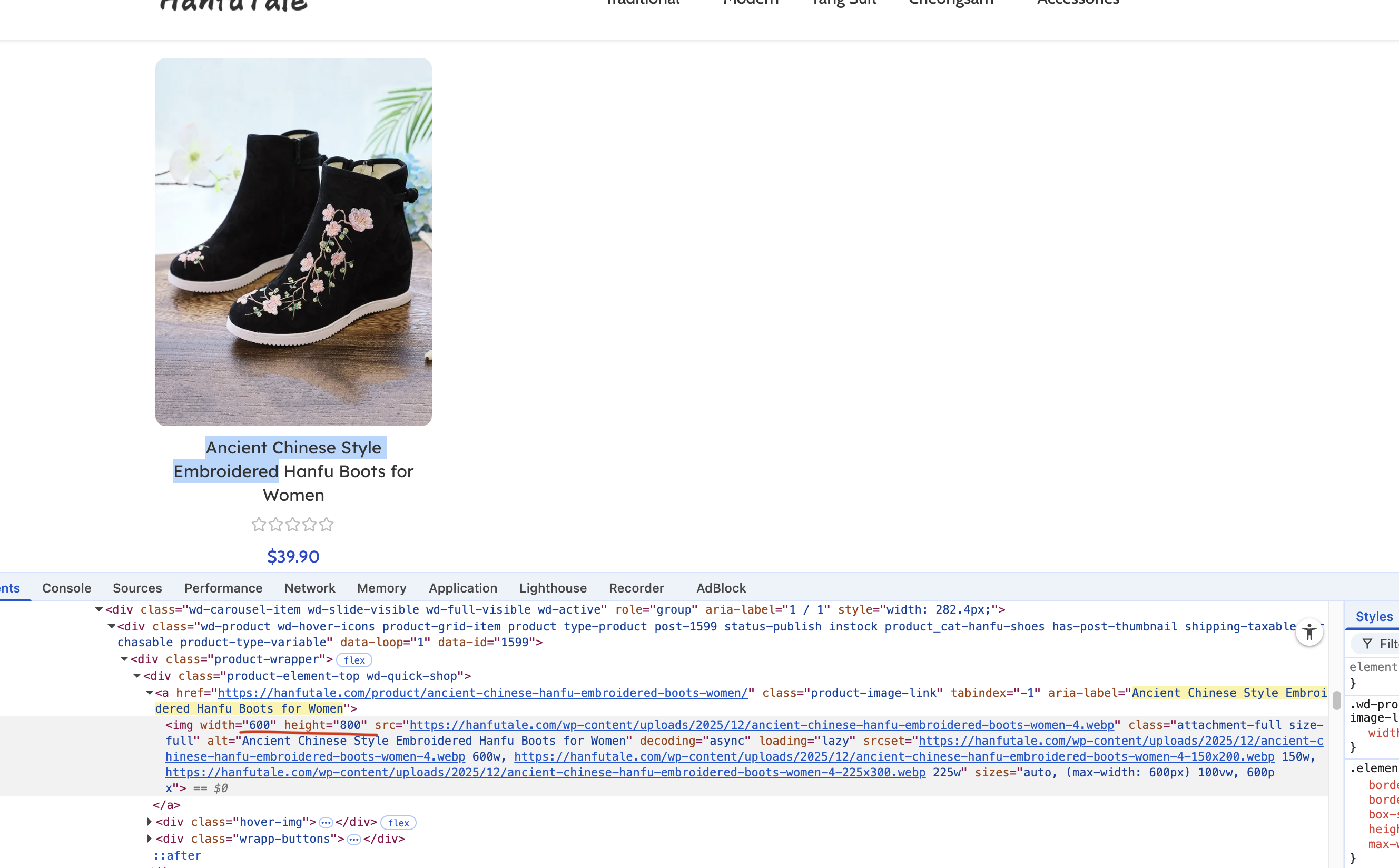
2303805254ParticipantPlease check the image I uploaded. The issue with the image displayed by PageSpeed appears to be due to a discrepancy between the displayed image size and the actual image size; the image is too large. You can check the image to confirm if this is the problem.
I want to know how to set the width and height of the main image on the product page.
Attachments:
You must be logged in to view attached files.December 11, 2025 at 10:58 am #700456
Artem TemosKeymasterHello,
To set a correct width for the single product page you need to go to Appearance -> Customize -> WooCommerce -> Product images and adjust an appropriate option. Note that you set the width only, and the height will be generated automatically based on the image aspect ratio.
Kind Regards
December 11, 2025 at 5:34 pm #700576
2303805254ParticipantI have already modified the image sizes as you suggested and cleared the plugin and CDN cache, but the issue with the product page still persists when tested through https://pagespeed.web.dev/. Also, how can I improve my website’s score to above 90? You can also check my website’s product page through https://pagespeed.web.dev/ to see the relevant data.
-
This reply was modified 1 month ago by
Attachments:
You must be logged in to view attached files.December 12, 2025 at 11:13 am #700651
Artem TemosKeymasterHello,
I have just tested your website with Pagespeed and see that there are no problems with image sizes https://gyazo.com/34189fced610593eff065ec0e31201d5
As for the overall performance, you can find a detailed tutorial with instructions and recommendations in our blog here https://xtemos.com/wordpress-performance-optimization-the-ultimate-guide-in-2021/Kind Regards
December 13, 2025 at 9:39 am #700786
2303805254ParticipantHello Artem Temos,
I tested several product pages, and most of them have image issues, although a few pages don’t have this problem. You can test the links I provided in the private message.
Attachments:
You must be logged in to view attached files.December 15, 2025 at 10:24 am #700900
Artem TemosKeymasterHello,
Could you please send us your admin access so we can check the configuration?
Kind Regards
December 15, 2025 at 2:50 pm #700964
2303805254ParticipantHello, Artem Temos
I think I discovered the cause of this problem when posting products today. Some of my uploaded images weren’t cropped to 800x600px, and Google’s speed detection tool flagged this issue.
If I crop the images to 800x600px, this problem doesn’t occur. However, my previous images weren’t 800x600px. How can I eliminate this image issue?
December 16, 2025 at 11:13 am #701075
Artem TemosKeymasterHello,
Please disable all plugins that are not related to our theme temporarily so we can troubleshoot this issue.
Kind Regards
December 16, 2025 at 11:41 am #701101
2303805254ParticipantHello
I have already disabled it.
December 16, 2025 at 11:49 am #701102
Artem TemosKeymasterWe have disabled the rest of the plugins and also switched off zoom option on the single product page. Please check how it works now.
December 16, 2025 at 12:07 pm #701106
2303805254ParticipantHello
I tested it and the issue persists on some pages. I’ve provided a few links in private messages; you can test them at https://pagespeed.web.dev/
Also, the SEO plugin might not be related to this issue. It controls my website’s SEO titles, and I need to enable it first.
Attachments:
You must be logged in to view attached files.December 17, 2025 at 6:53 am #701232
2303805254ParticipantHello, Artem Temos
This issue isn’t limited to product pages; it also affects images on the shop page. I believe the problem stems from the code controlling the displayed image size, while the actual image is still quite large.
The images aren’t being cropped to a custom responsive size, hence the “image is too large” message.
December 17, 2025 at 10:58 am #701264
Artem TemosKeymasterHello,
Our theme doesn’t control the size of the images. Anyway, as we can see, you have enabled the plugins again. Please keep them temporarily turned off so we can continue the investigation.
Kind Regards
December 17, 2025 at 11:40 am #701274
2303805254ParticipantHello,
I have disabled the plugins that are not related to the theme, but the Rank Math SEO plugin might not be able to be disabled. You can temporarily disable it while troubleshooting the problem, and then please re-enable it after you’re finished.
I have configured a lot of SEO-related information in the Rank Math SEO plugin, such as URLs and TDK (Title, Description, Keywords). Disabling it for an extended period would have a significant impact on my website’s SEO optimization.
Also, I would like to know where I can set the image dimensions. Other themes I’ve used seem to allow me to set image sizes directly through the theme’s functions.
December 17, 2025 at 11:59 am #701284
Artem TemosKeymasterHello,
We’ve reviewed all the images in the example link you provided and have some recommendations for each image in the report:
1. Images for related products are controlled by WooCommerce settings in Appearance -> Customize -> WooCommerce -> Product images. However, I noticed that your custom layout has a custom size set only for the related products. I’ve reverted it back to “WooCommerce thumbnail.” Here are the screenshots:
– https://gyazo.com/d7b2a2f271a105912ae7af446a20d669
– https://xtemos.nyc3.digitaloceanspaces.com/scr/2025/12/17/shot-1765961359-7aaae171914ad1bb.png
– https://gyazo.com/a306d98c225ff04c6cb12802b3463d5b2. The main product image is currently set to 750×1000 in WooCommerce settings. However, the pagespeed reports indicate that it can be reduced to 669×891. You can adjust this in Appearance -> Customize -> WooCommerce -> Product images. Here’s the screenshot:
– https://gyazo.com/e786482a11ca7102140387c69d849ed2
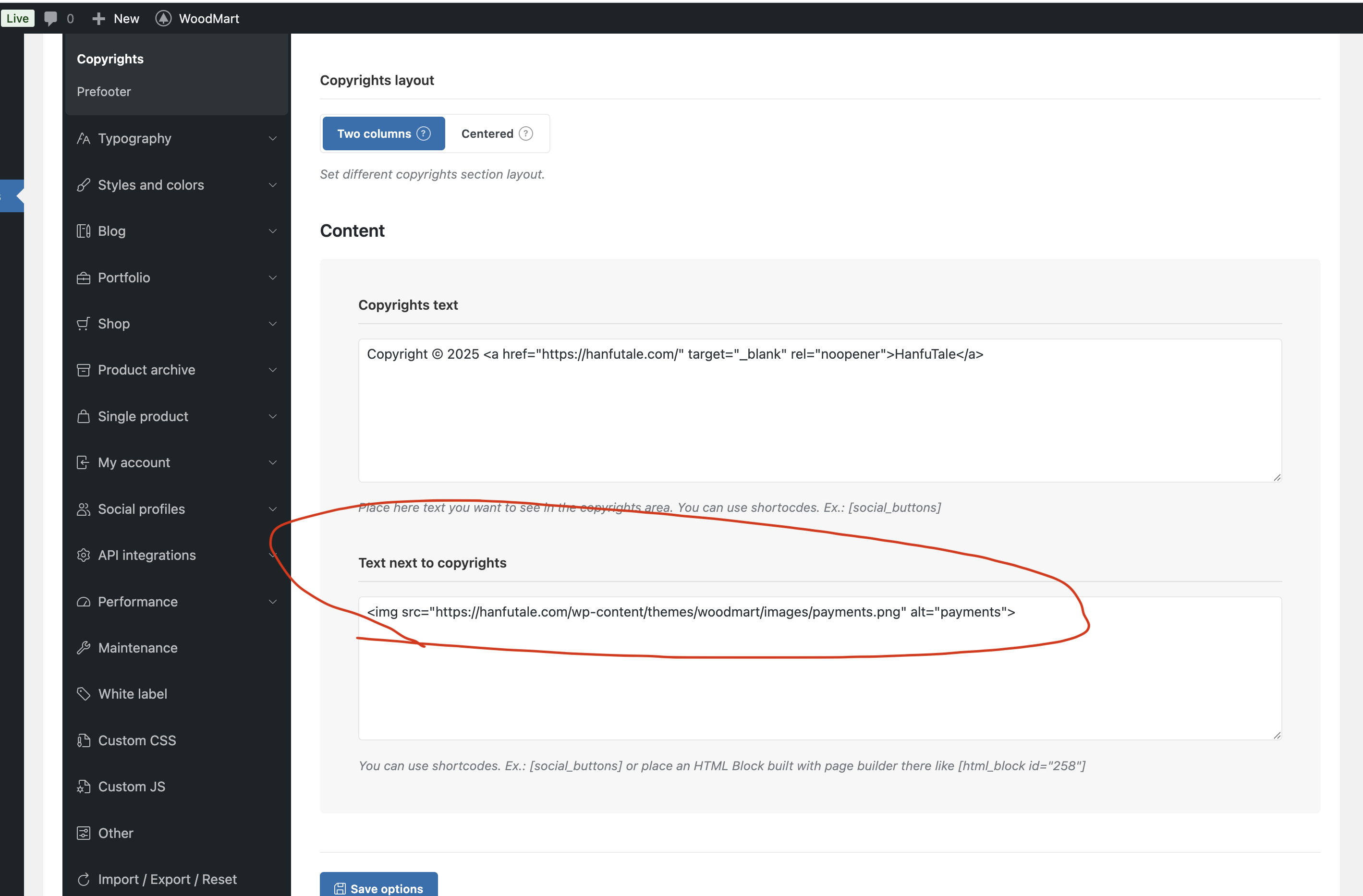
3. The image in the footer can be removed or replaced in Theme Settings -> Footer -> Copyrights. Here are the screenshots:
– https://gyazo.com/50652362ad6fd9842772da0fda8c6a0b
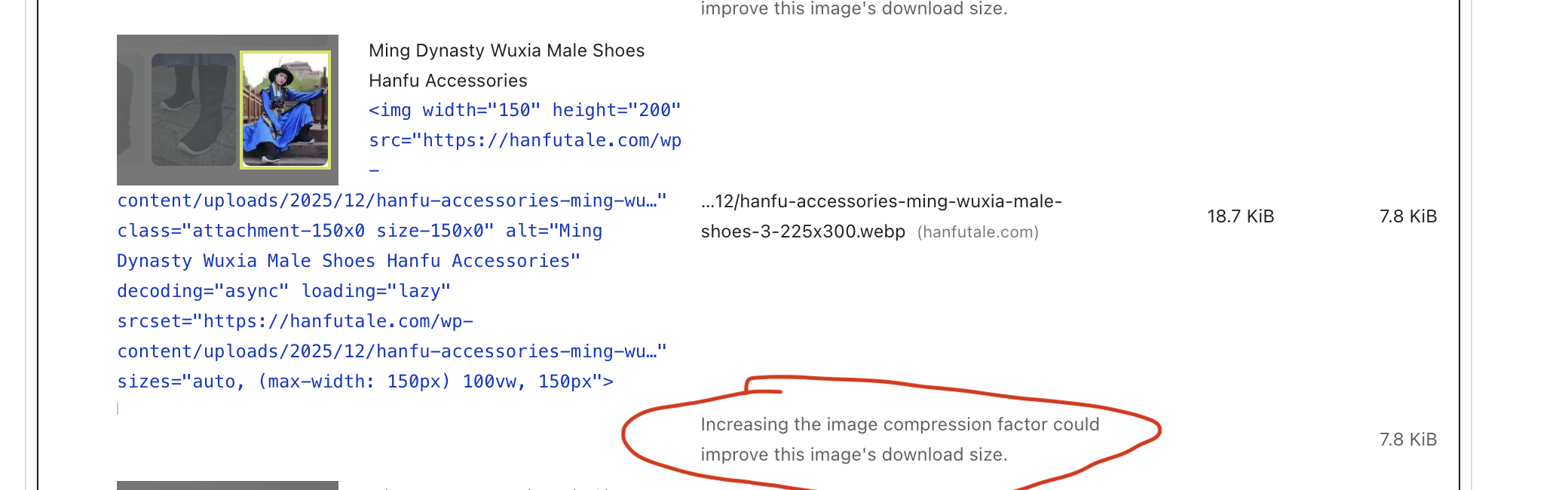
– https://xtemos.nyc3.digitaloceanspaces.com/scr/2025/12/17/shot-1765961509-a7623a9e8889f54d.png4. The rest of the images in the report are from product gallery thumbnails. However, the report doesn’t suggest any size adjustments but instead suggests compressing them even further before uploading. Here’s the screenshot:
– https://xtemos.nyc3.digitaloceanspaces.com/scr/2025/12/17/shot-1765961579-fff7af68140092c9.png
Kind Regards
December 17, 2025 at 12:25 pm #701296
2303805254ParticipantHello,
Does WooCommerce only support setting the image width for products, but not the image height?
Also, I would like to know if the product catalog allows for modifying image sizes.
Currently, the product image sizes on the /shop page are also problematic, but I don’t see any option to adjust the image size under “Appearance” -> “Customize” -> “WooCommerce” -> “Product Catalog”.
Attachments:
You must be logged in to view attached files.December 17, 2025 at 12:54 pm #701307
2303805254ParticipantHello,
I have changed the number of items per page in the directory to 200 and cleared the CDN cache, but the problem with the /shop page still persists.
Attachments:
You must be logged in to view attached files.December 18, 2025 at 10:01 am #701438
Artem TemosKeymasterHello,
Does WooCommerce only support setting the image width for products, but not the image height?
The height is actually generated automatically based on the image aspect ratio.
Also, I would like to know if the product catalog allows for modifying image sizes.
If you are using custom layout made with a page builder, please check if its
Product archiveelement doesn’t have a custom size set as I demonstrated for the related products in y previous reply.Kind Regards
December 18, 2025 at 10:56 am #701455
2303805254ParticipantHello, Artem Temos
I didn’t customize any settings; I imported your theme.
https://woodmart.xtemos.com/kids/
I’m finding that I need to adjust many settings in the elementor editor, and the theme settings aren’t working.
Are you referring to adjusting the Product archive element in the elementor editor within the Product archive layout?
December 19, 2025 at 10:28 am #701624
Artem TemosKeymasterHello,
Yes, this particular prebuilt website has a custom layout for the shop page built with Elementor. And it has a custom size for product images on the catalog page. You can adjust it in WoodMart -> Layouts as we showed on this video https://gyazo.com/a306d98c225ff04c6cb12802b3463d5b
Kind Regards
December 19, 2025 at 11:00 am #701632
2303805254ParticipantHello,
I followed your instructions and changed the global product archive page image to 200 and cleared the CDN cache, but the problem is still present in the report.
Attachments:
You must be logged in to view attached files.December 19, 2025 at 6:36 pm #701719
Artem TemosKeymasterTry to add the following PHP code snippet to the child theme’s functions.php file to do this
add_action('woocommerce_before_shop_loop_item_title', function () {
	add_filter( 'wp_calculate_image_srcset', '__return_false' );
}, 5);
add_action('woocommerce_before_shop_loop_item_title', function () {
	remove_filter( 'wp_calculate_image_srcset', '__return_false' );
}, 50);
December 20, 2025 at 6:38 am #701762
2303805254ParticipantHello Artem Temos,
Could you please confirm if this is an issue with WooCommerce or the theme? Will this problem be fixed in your next version update?
December 20, 2025 at 7:32 am #701763
2303805254ParticipantHello,
It seems my previous approach was incorrect. I’ve just realized that all the image issues on the website are due to the mobile version not being responsive. For example, the images on the mobile version are currently using a fixed size of 600×800 pixels.
Is this a problem with the theme? I’ve never encountered image issues with other themes I’ve used.
We’ve been communicating for a while now. Could you please thoroughly examine my website this time, analyze this problem, and resolve it as soon as possible?
The problem isn’t limited to the shop page; the product pages and category pages also have this issue.
-
This reply was modified 3 weeks, 6 days ago by
Attachments:
You must be logged in to view attached files.December 22, 2025 at 10:29 am #701912
Artem TemosKeymasterHello,
It is not a problem with the theme, but the way WordPress handles images with
srcsetandsizesattributes to load different images depending on the screen size. WoodMart doesn’t control these attributes and doesn’t change their value. If you switch to the Storefront theme and check the page with the same layout (for example, shop page with 2 columns on mobile) you will see the exact same issue. Find more information here https://developer.wordpress.org/apis/responsive-images/We sent you the code to disable
srcseton the shop page and always load image size as defined in WooCommerce settings. Please add it and test how it works on the shop page only. Let me know if it helps.Kind Regards
December 23, 2025 at 1:10 pm #702051
2303805254ParticipantHello Artem Temos
I’m still having the same problem after using the code you provided. I tested your test website (https://woocommerce-625997-2033187.cloudwaysapps.com/product/panton-tunior-chair/) and it doesn’t seem to have this issue.
Attachments:
You must be logged in to view attached files.December 23, 2025 at 1:17 pm #702055
2303805254ParticipantUsing the code you provided caused the images on my product categories and shop page to become very blurry. I have since removed the code.
You can see a comparison of the two images below; the blurry one is the image with the code used, and the clear one is the image with the code removed.
Attachments:
You must be logged in to view attached files.December 23, 2025 at 1:27 pm #702058
Artem TemosKeymasterHello,
As I can see, the code didn’t affect the “hover image”. Try to replace the previous code with the following one
add_action('woocommerce_before_shop_loop_item_title', function () {
		add_filter( 'wp_calculate_image_srcset', '__return_false' );
	}, 5);
	add_action('woocommerce_after_shop_loop_item_title', function () {
		remove_filter( 'wp_calculate_image_srcset', '__return_false' );
	}, 50);
Kind Regards
-
This reply was modified 1 month, 1 week ago by
-
AuthorPosts

- You must be logged in to create new topics. Login / Register