
Home / Forums / WoodMart support forum / Woodmart string translation
Home › Forums › WoodMart support forum › Woodmart string translation
Woodmart string translation
- This topic has 14 replies, 2 voices, and was last updated 4 months ago by
 Aizaz Imtiaz Awan.
-
AuthorPosts
-
May 25, 2026 at 12:33 pm #719257
SZenkoParticipantHello,
I have a problem translating the last phrase at checkout. The first two are translated in Woodmart strings, but the last one is not, and I can’t find it anywhere to translate.
Does anyone know where this translation is located?
Thanks for your help.
Monika
Attachments:
You must be logged in to view attached files.May 25, 2026 at 2:04 pm #719280Hello,
Try to translate that text via Loco Translate -> WooCommerce. Here is our article with more details: https://xtemos.com/docs-topic/translate-woodmart-theme-with-loco-translate/
Best Regards
May 25, 2026 at 2:08 pm #719283
SZenkoParticipantHello,
we use WPML translation plug in and we can’t find this phrase to translate.
Any suggestions to translate it by this plug in?
Thanks 🙂
May 25, 2026 at 3:43 pm #719318Hello,
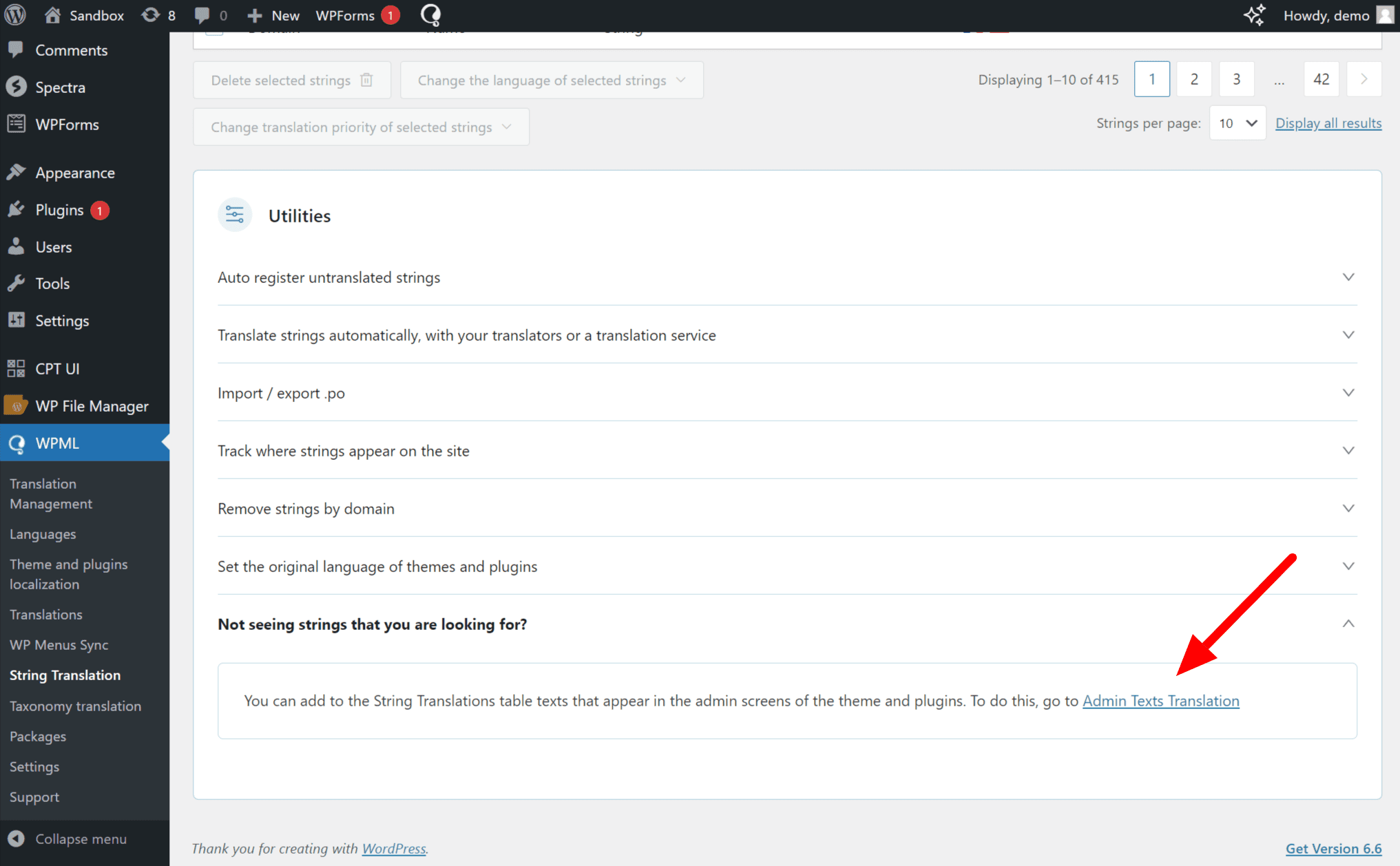
Please go to WPML >> String Translation >> Scroll to Utilities, expand the Not seeing strings you are looking for? section, and click on the Admin Texts Translation link. https://cdn.wpml.org/wp-content/uploads/2024/07/Admin-text-translations-in-string-translation.png
This will take you to a searchable list of admin strings. Find the Words that you want to translate, and then select those words and add them to the string translation. Then, you will go to the WPML >> String Translation >> then find and translate them into other languages.
If the issue still exists then please send me the WP admin login details of your site so I will check and solve the issue for you.
Best Regards
June 1, 2026 at 12:44 pm #720129
SZenkoParticipantHello,
string could not be found even in admin texts translation strings.
What do you recommend?
Thanks for your help.
Br, Monika
June 1, 2026 at 2:02 pm #720139Hello,
Sorry to hear about the inconvenience. Kindly, please share your Site WP-ADMIN Login details in the Private Content field so that we can check this concern on your Site and help you out accordingly.
Best Regards
June 3, 2026 at 8:58 am #720379
SZenkoParticipantHello,
sending the details in private content.
BR, Monika
June 4, 2026 at 8:33 am #720496June 4, 2026 at 8:59 am #720503
SZenkoParticipantPlease see the link below
June 4, 2026 at 9:01 am #720504
SZenkoParticipantFrom which country do you access to our site?
BR, Monika
June 4, 2026 at 12:31 pm #720547Hello,
I am accessing from Pakistan.
Best Regards.
June 4, 2026 at 1:43 pm #720556
SZenkoParticipantHello,
you can access now to our site.
In case of any problems, please let us know.
BR, Monika
June 4, 2026 at 3:21 pm #720573Hello,
Your issue has been solved. Now you can easily translate it from the WPML >> String Translation section.
Best Regards.
June 4, 2026 at 3:58 pm #720579
SZenkoParticipantHello,
thanks a lot!
How did you do it/find it?BR, Monika
June 5, 2026 at 1:24 pm #720657Hello,
I have just updated the woomdart .po file manually in WPML >> String Translation section. Then the latest words sync and are available for the translation.
Best Regards.
-
AuthorPosts


- You must be logged in to create new topics. Login / Register