
WordPress blog
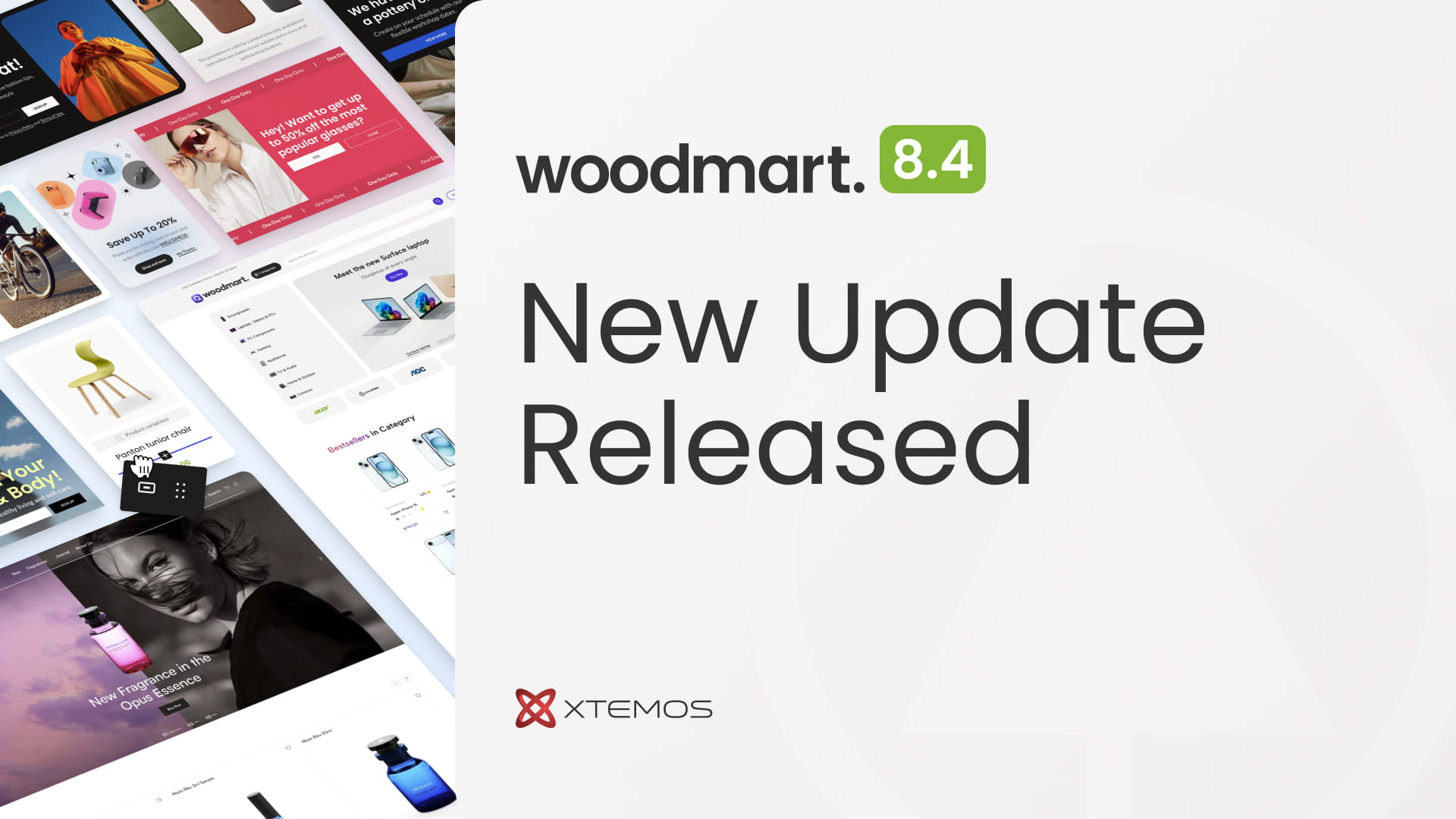

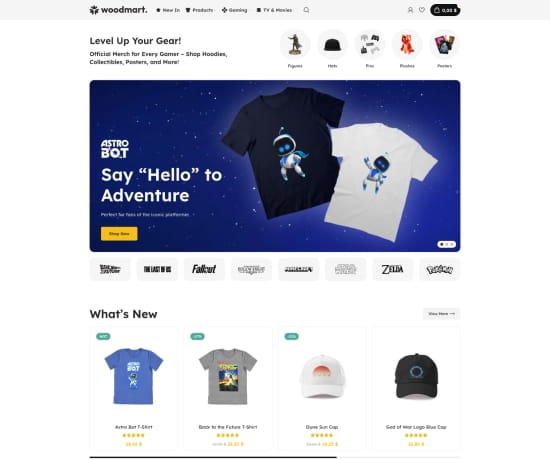
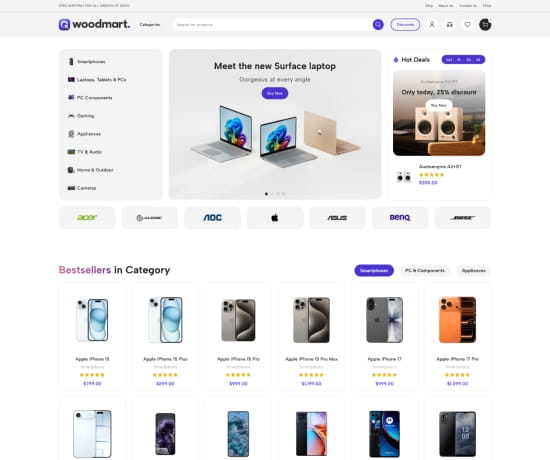
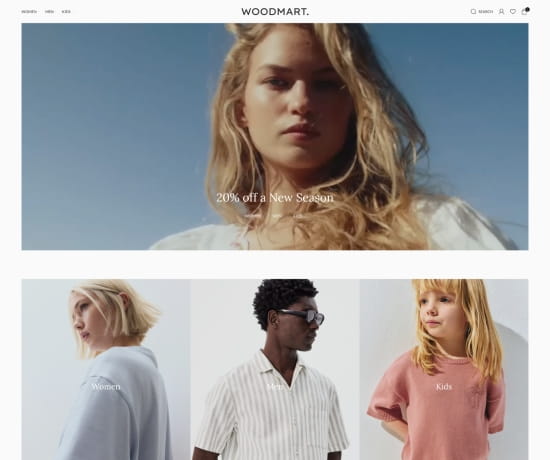
The release of WoodMart 8.4 introduces several highly requested features, four new pre-built websites, and various improvements to the WooCommerce builder. This update focuses on enhancing store performance and expanding design options, providing users with more tools to customize and optimize their e-commerce platforms. To begin with, to provide more flexibility across different niches, we’ve added four diverse, high-converting demos:
- Merchandise: Video game merch, collectibles, and fan souvenirs store with a bold, immersive UI.
- Electronics 3: A clean, high-tech layout perfect for gadgets and appliances.
- Fashion 2: A trendy, minimalist aesthetic for modern apparel brands.
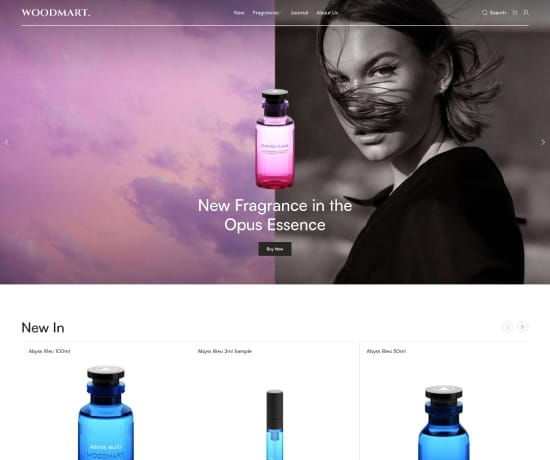
- Perfumes: Elegant and sophisticated design tailored for beauty and fragrance shops.
Product loop item layout builder
The most significant architectural advancement in version 8.4 is the introduction of the Product Loop Item Layout Builder. This feature marks a transition toward total design autonomy, allowing users to move beyond predefined shop grid styles. By utilizing a familiar drag-and-drop interface, administrators can now construct custom layouts for product cards within the catalog. This ensures that every element — from titles and pricing to custom action buttons — aligns perfectly with the brand’s unique visual identity. This level of customization, previously reserved for single product pages, is now fully integrated into the shop archive, providing a cohesive and professional shopping experience across the entire site.
You can create product loops on the Layouts page in the WoodMart admin panel by selecting the Loop item tab and clicking the Add Layout button. In the popup that appears, you can either create a new product layout from scratch or choose from predefined layouts with 23 ready-to-use designs. These predefined layouts include our standard versions as well as 11 completely new designs.
Important note: Although the Product Loop Layout Builder is available on sites using any page builder supported by the theme, product designs can only be created using the native WordPress Gutenberg editor. This decision was made due to the limitations of WPBakery and Elementor regarding absolute positioning, nested element restrictions, and the lack of global “Parent Hover” functionality — all of which are critical for building medium-to-high complexity product designs. Find more details about the Product Loop Layout Builder in our documentation here.
GDPR. Performance. Local Google Fonts
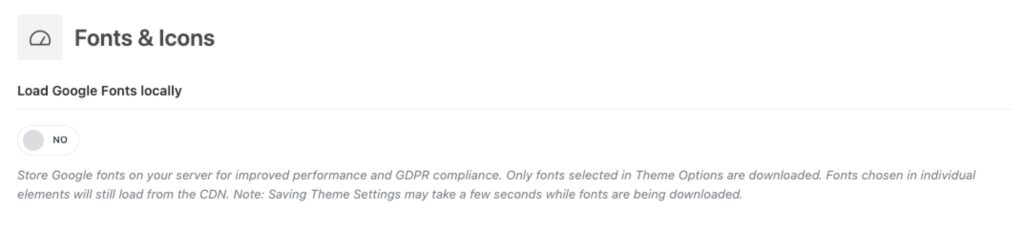
Core Web Vitals and site speed remain a primary focus of our development roadmap. In this update, we have introduced a built-in option to load Google Fonts locally, which significantly reduces external server requests and assists in maintaining GDPR compliance. This is complemented by an optimized font-weight management system that allows for consistent typography without sacrificing load times. Furthermore, we have completed the migration of our Elementor template library to the modern Containers framework. This refactoring reduces DOM depth and simplifies the underlying HTML structure, resulting in a leaner, more responsive website that performs exceptionally well under heavy traffic.
Enhancements for SEO and Marketing
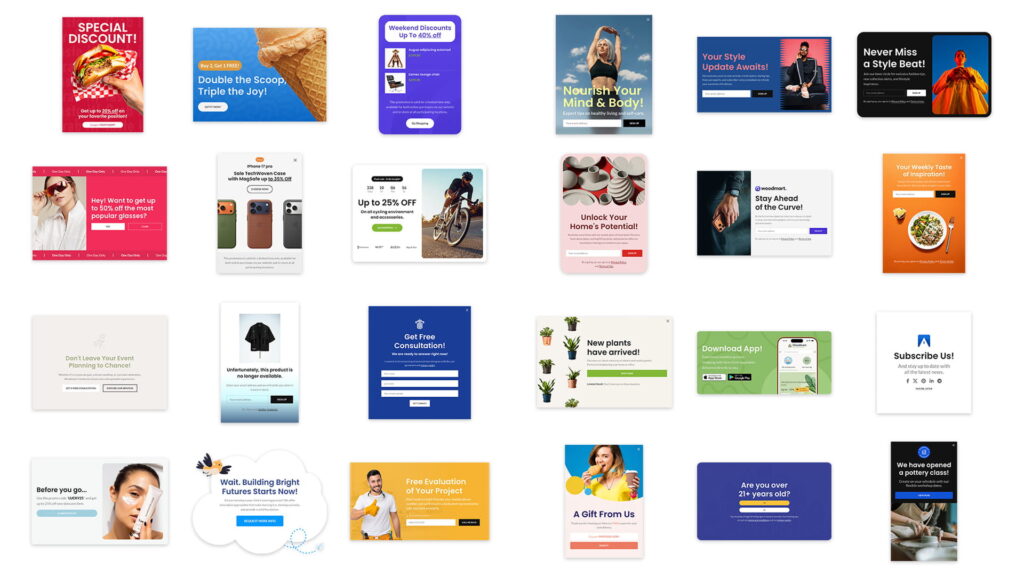
To support the growth of your business, we have expanded the theme’s compatibility with essential marketing and SEO tools. WoodMart 8.4 now features native breadcrumb support for Rank Math and All in One SEO, ensuring that site hierarchies are accurately indexed and displayed within search engine results. Marketing efforts are further supported by a new collection of predefined layouts for Popups and Floating Blocks, designed to streamline the implementation of promotional campaigns.
Customization at every level
- Header builder: New “Text” design options for action elements and dropdown background/shadow controls for Main menu, Menu, My account elements.
- Sliders: New “Style 4” pagination and text option for “Style 2”.
- Estimated delivery: Added option for days count for delivery time estimation.
- Shipping progress bar: You can now set a base price for free shipping calculations (subtotal without tax).
- Thank you page: Added conditions for the Thank You page layout for better personalization.
Updated logic for Wishlist and Compare buttons
We have refined the interaction logic for Wishlist and Compare buttons to provide a more intuitive user experience and reduce unnecessary page reloads:
- Wishlist Toggle: the Wishlist button now functions as a true toggle. Clicking the heart icon for the first time adds the product to the user’s list; clicking it a second time immediately removes it.
- Enhanced Compare Logic: when a user clicks the Compare button for the first time, the product is added to the comparison list. A second click will now act as a shortcut, redirecting the user directly to the Compare page.
- Persistent Compare State: if the “Save button state after adding in compare list” option is enabled in Theme Settings, the button state will be preserved after a page refresh. In this mode, clicking the button again on a product that is already in the list will remove it from the comparison, allowing for easier list management directly from the shop grid.
Gutenberg styles migration (ID to Classes)
To support the high flexibility of the Product Loop Layout Builder, we have optimized how styles are generated for Gutenberg blocks. Previously, block-specific styles (like colors or spacing) were often tied to unique element IDs. In version 8.4, we have transitioned to a class-based styling system. In most cases, no manual action is required from your side. The theme is designed to handle this transition automatically – simply re-save the page or the specific Layout, and the system will instantly convert the old ID-based styles into the new class structure.
Plugin support & сompatibility policy
To ensure the long-term stability of your store, we have officially published our Plugin Support Policy in the theme documentation. While WoodMart is built following strict WordPress and WooCommerce coding standards to ensure “out-of-the-box” compatibility with the majority of the ecosystem, this new guide clarifies our scope of support. It provides a comprehensive list of plugins with advanced integration (such as specialized styling for Multi-vendor, Payment Gateways, and SEO tools) and identifies potential areas of conflict with built-in theme features. We encourage all users to review the full policy here to better understand how to maintain a high-performance, conflict-free environment.
Important update notes (Action required)
To make the Product Loop Layout Builder possible, we had to significantly refactor the structure and styles of several unified elements within the product loop and single product pages. Consequently, if you have previously customized these elements or used specific configuration options, you may need to perform the following actions after the update:
Action buttons
Elements such as Wishlist, Compare, Quick View, Size Guide, Price Tracker, and others now use different classes and a separate wrapper for the icon.
- If you used Layout elements: if typography or colors appear incorrect after the update, you simply need to re-save the specific Layout where these elements are located.
- If you used custom code: you must update your custom CSS by replacing the old selectors with the new ones: for icons replace
.wd-action-btn > a:beforewith.wd-action-btn .wd-action-icon, for text replace.wd-action-btn > a > spanwith.wd-action-btn .wd-action-text
Product lables
To make Product Labels a functionally independent element that can be used either together or separately anywhere within a Product Loop Item, we had to modify their structure and logic. Under certain conditions, their appearance may change:
- Rectangle labels (small rectangular style) no longer adhere strictly to the edge of the product thumbnail if global border-radius is disabled in the Theme Settings. They are now positioned with a margin from the image edges, consistent with all other label types.
- CSS classes are now applied to each individual label rather than their common wrapper. If you used custom code targeting label design classes, you must update it following this pattern: replace
.product-labels.labels-rounded .product-labelwith.product-label.wd-shape-round.
Other
- Header builder. Since all Header Builder elements displayed as icons or icons with text have been updated and standardized to support a “text only” design option, certain settings combinations may affect their appearance. Specifically, if you use My Account with the Display: Icon option and Show username enabled, the text next to the icon may disappear. In this case, you need to go to the element settings and change the Display option to “Icon with text.”
- AJAX Products tabs. Once you start using the Product Loop Layout Builder and display a newly created design within the AJAX Products tabs element, you might encounter issues where product hover effects don’t work correctly or trigger simultaneously on all items. If you notice this behavior, simply re-save the page containing the affected AJAX Products tabs element.
If you encounter any issues with theme after the update, please make sure to re-save the Theme Settings, the specific layout or page where the issue occurs, and clear your cache. If you still observe any problems, please contact our support using the following link.
Full changelog
- NEW VERSION: Electronics 3
- NEW VERSION: Fashion 2
- NEW VERSION: Perfumes
- NEW VERSION: Merchandise
- NEW FEATURE: Product loop item layout builder. (Video)
- ADDED: Breadcrumbs support for Rank Math and All in One SEO plugins. (Screenshot)
- ADDED: New predefined layouts for Popup and Floating Blocks. (Screenshot)
- ADDED: “Text” to Design option in Header Builder elements. (Screenshot)
- ADDED: New pagination style “Style 4” for sliders. (Video)
- ADDED: Ability to add text in “Style 2” for Slider pagination. (Screenshot)
- ADDED: “Padding” option for advanced buttons in Theme Settings. (Screenshot)
- ADDED: “Typography” options for Product Stock Status element. (Screenshot)
- ADDED: Conditions for Thank You page layout. (Screenshot)
- ADDED: Support for setting a background image via an “img” tag for the Banner element in Gutenberg. (Screenshot)
- ADDED: “Background color” and “Box shadow” options for dropdowns in Menu, Main Menu, and My Account elements in Header Builder. (Screenshot)
- ADDED: “Color”, “Background color”, and “Dropdown indicator color” options for Menu and Main Menu elements in Header Builder. (Screenshot)
- ADDED: Attribute term image metabox and related options for Product Tabs and Product Additional Information Table elements. (Screenshot)
- ADDED: “Categories with shadow” option for Product Categories element in Gutenberg. (Screenshot)
- ADDED: “Menu order” option for Brand element. (Screenshot)
- ADDED: Base price option for free shipping progress bar calculation. (Screenshot)
- ADDED: “Load Google Fonts locally” option in Theme Settings. (Screenshot)
- ADDED: “Off-canvas sidebar width” option for off-canvas containers. (Screenshot)
- ADDED: “Link color” option for the Single Product Meta block in Gutenberg. (Screenshot)
- ADDED: “Border” styles option for the Product Additional Information element. (Screenshot)
- ADDED: Padding option for Wishlist, Compare, Size Guide, and Track Price elements in single product layout. (Screenshot)
- ADDED: Waitlist compatibility with WPC Product Bundles and WPC Composite Products plugins.
- ADDED: “Full screen opener” option for Header Builder search element. (Screenshot)
- ADDED: Synchronization of first and last names during login with Google and Facebook.
- ADDED: “Space between list products” option for product loop list design. (Screenshot)
- ADDED: VH unit support for “Banner Height” option in Promo Banner element. (Screenshot)
- ADDED: Typography options for Off-canvas column button element. (Screenshot)
- ADDED: “Display as days count” for delivery time estimation. (Screenshot)
- ADDED: Color options for Off-canvas column button element. (Screenshot)
- ADDED: Icon size option for Off-canvas column button element. (Screenshot)
- ADDED: Custom gap for “Main Menu” and “Menu” elements in Header Builder. (Screenshot)
- ADDED: “Disable active style” option for My Account Navigation element. (Screenshot)
- ADDED: Native WordPress auto-updates support for the WoodMart Core plugin.
- FIXED: Spacing options for Portfolio and Blog elements.
- FIXED: Issue with zero-value gaps for elements with grid attributes on mobile.
- FIXED: Issue with zero-value spacing for Blog and Portfolio archive elements.
- FIXED: Single product layout preview issue with Product Tabs element.
- FIXED: Countdown timer display for variable products in single product layout.
- FIXED: Flickering issue in the Filter Products by Price widget.
- FIXED: Price tracker desired price validation to support amounts less than 1.
- FIXED: Gutenberg divider block with icon inner block.
- FIXED: Issue where empty links in Extra Menu List element displayed without a title attribute.
- FIXED: Elementor dropdown menu styles not loading from localStorage cache on page reload.
- FIXED: Elementor cache issue with Floating Block import.
- FIXED: Twitter API deprecation messages.
- FIXED: Inactive save button after image upload on the widgets page.
- FIXED: Social links sanitization before saving. (Topic)
- FIXED: Translations for Register & Login widget titles. (Topic)
- FIXED: Accessibility issue in single product carousel pagination.
- FIXED: Paragraph block translation issue in WPML Advanced Translation Editor. (Topic)
- FIXED: Single variation display issue in the WCFM Marketplace plugin. (Topic)
- FIXED: Page title display for empty shop categories. (Topic)
- FIXED: WPML links in AJAX shop now go to the correct translated category. (Topic)
- FIXED: Mobile categories layout option in Product Categories element (Gutenberg).
- FIXED: Accent color in WooCommerce email previews.
- FIXED: Navigation background color options.
- FIXED: Stock status for grouped products.
- FIXED: AJAX rendering issues with Gutenberg blocks (Blog, Products, Products Tabs, Portfolio) in Header Builder frontend editor.
- FIXED: Dynamic Discounts calculation issue with WooCommerce Subscriptions. (Topic)
- FIXED: Estimate Delivery compatibility with Dokan plugin. (Topic)
- FIXED: Products archive layout condition issue. (Topic)
- FIXED: Product search filter now correctly handles accented characters. (Topic)
- FIXED: Issue with the Product Category filter widget when the “Collapse widgets” option is enabled. (Topic)
- FIXED: Issue with the “Stretch Row and Content” options in Chrome v145. (Topic)
- FIXED: Cart empty page redirect and undo logic after removing an item from checkout.
- FIXED: AJAX Load More displays raw JSON when opened in a new tab (Products, Portfolio, Blog).
- FIXED: Compatibility with PHP 8+. (Topic) (Topic)
- REFACTORED: The “Show username” option now only works if the Account element has “Text” or “Icon with text” design enabled.
- REFACTORED: Product Additional Information table and tabs elements options.
- REFACTORED: Accent and Default button styles.
- REFACTORED: Header banner structure.
- REFACTORED: Empty pages layouts.
- REFACTORED: Archive description.
- REFACTORED: Product labels styles and structure.
- REFACTORED: Wishlist, Compare, Size Guide, and Track Price elements options in single product layout.
- REFACTORED: Price selectors in the Single Product Price element and Advanced Typography.
- REFACTORED: Dokan Dashboard page styles.
- REFACTORED: Star rating structure in product loop.
- REFACTORED: Gutenberg block styles are applied via CSS classes instead of IDs.
- IMPROVED: Template library Elementor content migrated from sections/columns to containers.
- IMPROVED: Popup and Floating Blocks post IDs now use auto-increment when imported or created.
- IMPROVED: Moved Gutenberg layout blocks to the top of the elements list.
- IMPROVED: Layout shifting caused by scrollbar appearance/disappearance.
- IMPROVED: Sticky header background behavior while scrolling.
- IMPROVED: Close button for Popup and Floating Block is now removed from the DOM when disabled.
- IMPROVED: Button switch design for different languages.
- IMPROVED: Repeated clicks on buttons now properly remove products from Wishlist, Compare, and Price Tracker lists.
- UPDATED: WooCommerce templates.
- UPDATED: Google Fonts list.
- DEV: Added new filter ‘woodmart_wishlist_cookie_expires’ to control wishlist cookie expiration.
- REMOVED: Deprecated ‘woodmart_get_old_classes’ function.
- REMOVED: Functions marked as deprecated prior to version 8.0.


