
WordPress blog

How to stop bot traffic to WoodMart product filters with Cloudflare

A WoodMart case study on reducing server load from WooCommerce faceted-navigation URLs with Cloudflare.
On our own WoodMart demo sites, we found automated crawlers repeatedly opening product-filter, sorting, and layout URLs. The sites do not process real customer traffic, but these requests still reached WordPress and triggered product archive queries.
We added a narrowly scoped Cloudflare Managed Challenge rule. During the next seven-day period, it matched 1.31 million requests—3.5% of all site traffic. Only 1.6% passed the challenge, so 98.4% of the matching traffic was stopped at Cloudflare.


Before enabling the rule, we could see CPU usage climbing to almost 100% in the terminal during peaks of bot activity. After Cloudflare started challenging these filter requests, those crawler-related load spikes disappeared from our demo servers. We are not assigning a percentage to the CPU reduction, but the practical difference was immediately visible.
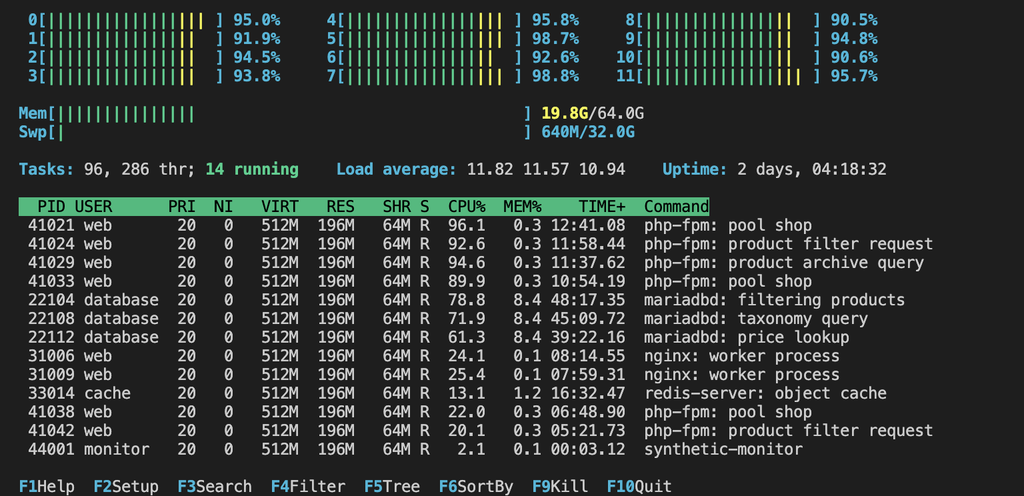
What the crawlers were requesting
WoodMart and WooCommerce filters create query-string URLs. A crawler can combine attributes, categories, prices, stock status, sorting, and display options into a large number of distinct archives. Typical anonymized examples look like this:
/shop/?filter_color=black
/shop/?filter_size=large&query_type_size=or
/shop/?min_price=50&max_price=100&orderby=price
/shop/?filter_category=lighting&stock_status=instock
/shop/?filter_color=black&per_page=96&shop_view=list
A page-cache plugin remains important for normal pages—see our WoodMart performance optimization guide. It cannot eliminate every cold request when bots continuously generate new filter combinations. Google describes the same underlying problem in its documentation on faceted-navigation URLs.
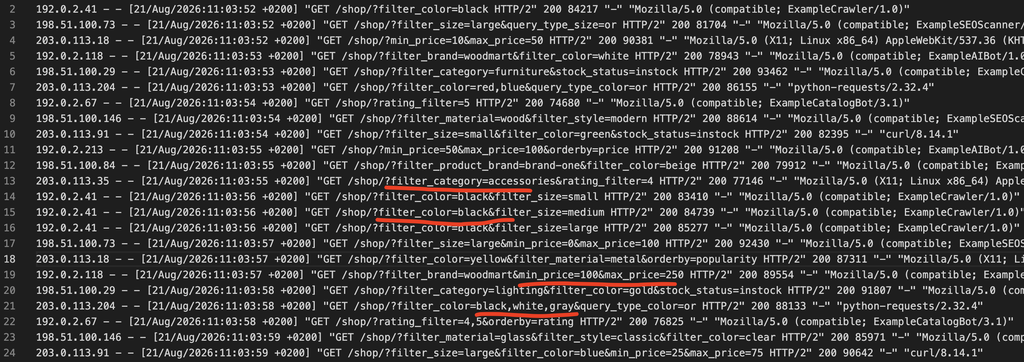
The Cloudflare rule we tested
Create a custom rule under Cloudflare → Security → Security rules → Create rule → Custom rules, paste the expression below, and select Managed Challenge:
(http.request.uri.query contains "filter_") or
(http.request.uri.query contains "per_page=") or
(http.request.uri.query contains "per_row=") or
(http.request.uri.query contains "shop_view=") or
(http.request.uri.query contains "stock_status=") or
(http.request.uri.query contains "min_price=") or
(http.request.uri.query contains "max_price=") or
(http.request.uri.query contains "orderby=")
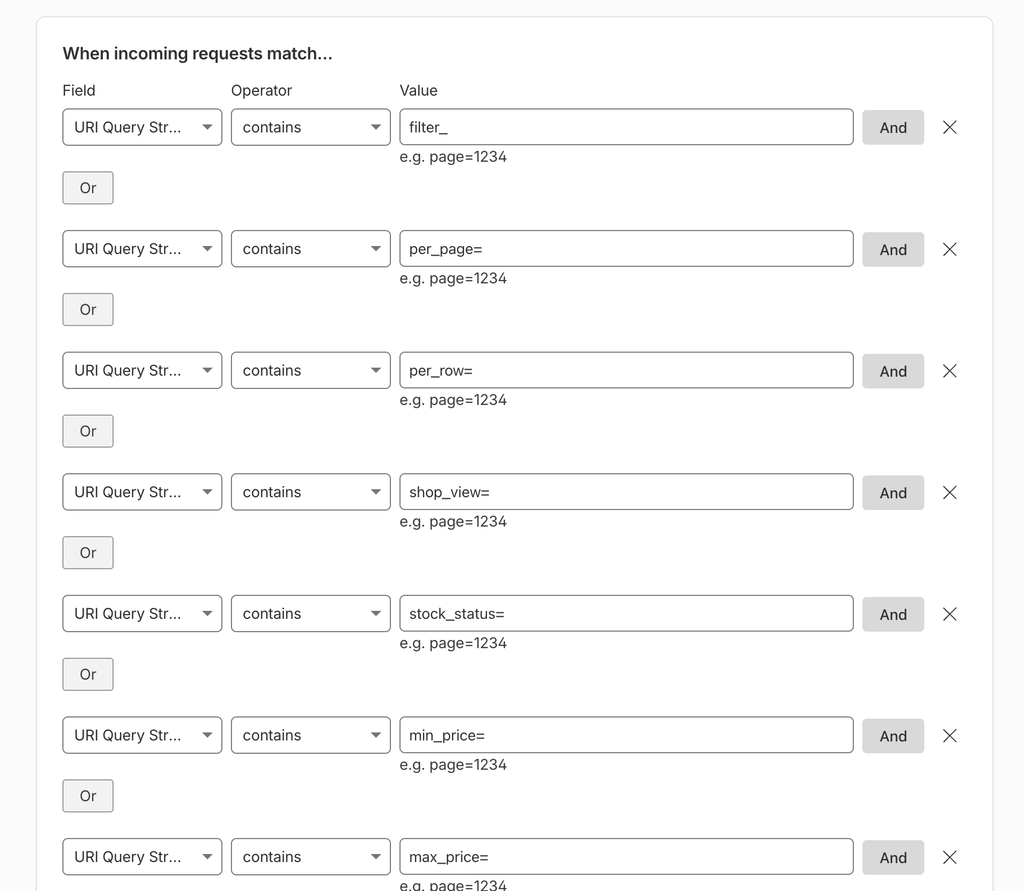
contains and connect the conditions with Or.The contains "filter_" condition is intentionally simple and broad. It catches parameters such as filter_color, filter_size, filter_category, and filter_product_brand wherever they appear in the query string. That simplicity also creates some false-positive risk, so review Cloudflare Security Events after deployment and narrow the rule if another feature uses the same text.
These are standard parameters from our WoodMart/WooCommerce setup, not a universal list for every store. Open the browser Network panel, apply each shop control, and confirm the parameters used by the actual site.
| Parameter | What it controls | Challenge? | Crawl management? |
|---|---|---|---|
filter_* | Attributes, categories, and brands | Yes on our demos | Usually disallow unless these are SEO landing pages |
per_page= | Products shown per page | Yes | Usually disallow |
per_row= | Products shown per row | Yes | Usually disallow |
shop_view= | Grid or list layout | Yes | Usually disallow |
stock_status= | In-stock, sale, or backorder results | Yes | Depends on the store’s indexation plan |
min_price=, max_price= | Price ranges | Yes | Usually disallow unless intentionally indexed |
orderby= | Price, rating, date, or popularity sorting | Yes | Usually disallow |
For WoodMart setup details, see Create a product filters form, Add a filters area to a custom shop layout, and the Product Archive Builder.
Test WoodMart AJAX Shop before rollout
Cloudflare Challenge Pages are not fully compatible with AJAX/XHR. In our WoodMart tests, the first filter request opened as a regular page and displayed the challenge. After it was passed, the page loaded correctly and subsequent AJAX filtering worked normally.
Test the rule on staging or in a clean private browser session before rollout. Check the first filter request, several subsequent filters, and both desktop and mobile. If filtering becomes stuck or the product grid displays challenge content, do not deploy the rule unchanged. Cloudflare explains this limitation in its AJAX/XHR compatibility documentation.
SEO and crawl management
The Cloudflare rule protects the server but does not manage indexation. Use robots.txt, canonical URLs, and the store’s SEO settings to control unnecessary faceted-navigation URLs. For example:
User-agent: *
Disallow: /*?*filter_
Disallow: /*?*min_price=
Disallow: /*?*max_price=
Disallow: /*?*orderby=
Extend this list only after an SEO review. Abusive bots can ignore robots.txt, so it cannot replace the Cloudflare rule.
Should Googlebot bypass the rule?
Cloudflare’s cf.client.bot field can identify verified crawlers. Allowing them to bypass the rule preserves crawl access but sends more requests to the server; challenging them reduces load but may affect the site’s SEO strategy. If you use Cloudflare’s verified-bot rule example, be careful with Skip all remaining custom rules: it also bypasses other lower-priority custom rules. Review the complete WAF ruleset first.
When you should not use this rule unchanged
Do not copy this rule directly when:
- Filter combinations are intentional, indexable SEO landing pages.
- Feeds, monitoring, mobile apps, or partner integrations use these query parameters.
- The first filter interaction must remain AJAX-only with no full-page challenge.
- The same parameter names are used by legitimate workflows outside the shop.
In those cases, narrow the rule by hostname or shop path, exclude trusted traffic, or use rate limiting instead of challenging every match.
Conclusion
On our WoodMart demo sites, crawler traffic to product-filter URLs was not harmless background activity. It generated 1.31 million requests in seven days and coincided with server-load spikes that reached almost 100% CPU. After enabling the Cloudflare rule, 98.4% of matching requests were stopped and those spikes disappeared.
For stores seeing the same pattern, this rule is a practical starting point. Check which parameters the store actually uses, review Cloudflare Security Events for false positives, and keep crawl and indexation decisions aligned with the site’s SEO strategy.

Leave a Reply
You must be logged in to post a comment.
4 thoughts on “How to stop bot traffic to WoodMart product filters with Cloudflare”
Thanks for sharing such detailed data and actionable insights! It’s incredible, and frustrating, to see just how much bandwidth and CPU capacity get eaten up by non-legitimate traffic and rogue crawlers. Surfacing these numbers, like 1.31 million requests in just seven days, really highlights a hidden issue that so many store owners and developers face without even realizing it. Exposing how these bad actors operate behind the scenes, and providing a clear, practical Cloudflare rule to stop them, is a huge win for the community.
I run a pretty aggressive Cloudflare WAF setup myself to combat this. Beyond query parameter filtering, I also use rules to filter out probes on WordPress logins, protect account creation with Turnstile, and set Managed Challenges for countries outside my target market.
On top of standard bad actors, I also block SEO scrapers like Semrush and Ahrefs. While they aren’t technically classified as bad bots, they consume valuable resources by scraping site data to sell to competitors without delivering any real value to store owners. Additionally, I block outdated browser and operating system user-agent strings, which automated bots frequently use to mask their traffic.
A couple of quick tips for anyone setting these up:
*Watch rule priority:* Make sure to pay close attention to your evaluation order in Cloudflare, so your challenges, bypasses, and blocks execute in the correct sequence.
If needed, *Exclude your origin server:* If you use WP-Rocket or another local caching plugin, don’t forget to exclude your own host or server IP from these rules, or you risk breaking your background pre-caching! I set ALL my client site up with these type of rules and even some htaccess rules also, honestly you have to these days.
Currently on one site I administer these rules stop around 1.5-2 million probes a week! before reaching the website!
Appreciate you bringing transparency to this topic, and saving developers hours of troubleshooting server spikes!
This is a way to deal with a problem that is one of the most important for Woocommerce. In my opinion, it is better to take preventive actions to deal with the causes so that the problem does not arise. Obfuscating faceted navigation by replacing a tags with span/div with event handlers is one of the solutions that can be implemented at the theme level, or at the Woocommerce level itself (it is not there yet). I hope it will appear someday.
Additionally, you should add Apply and Clear buttons before running filters (at least for the mobile version)
Encode url in Base64 format in data attribute in span/div